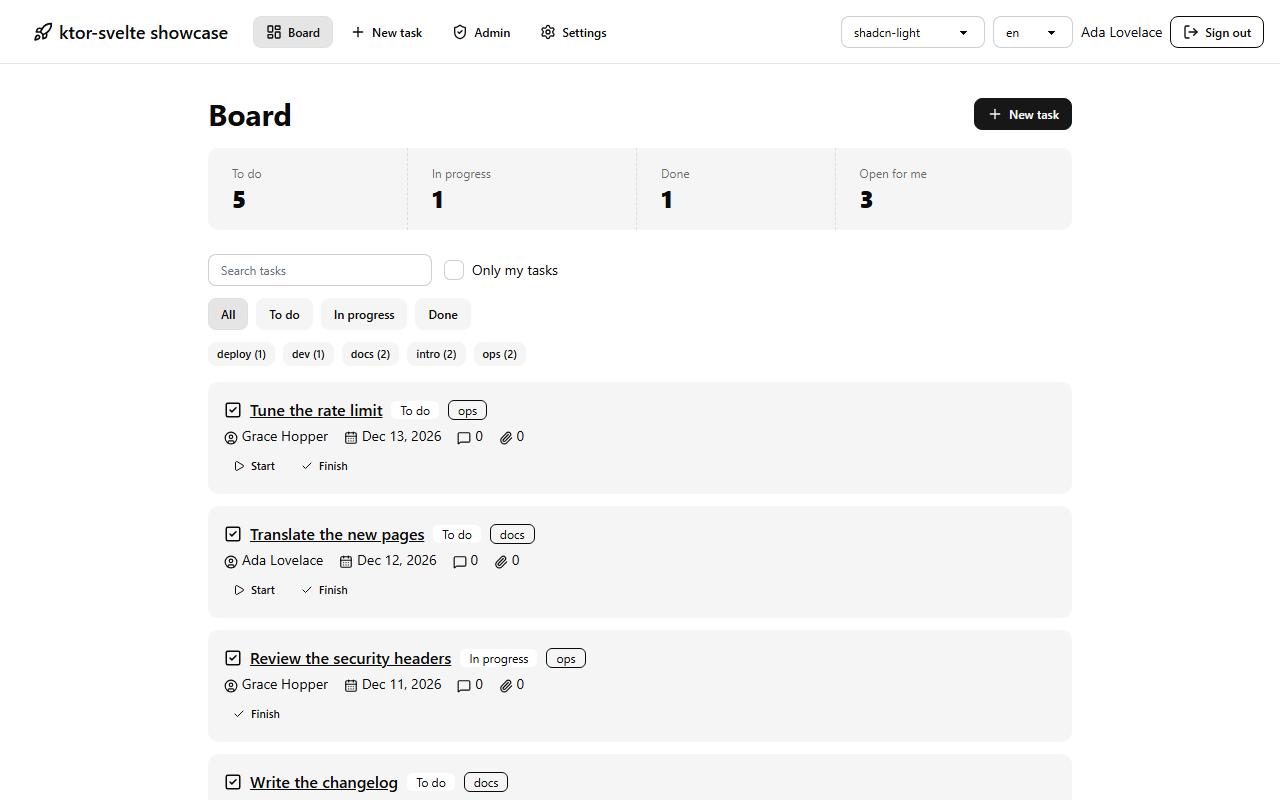
# ktor-svelte 1.4.0 > Ship a Ktor API and a SvelteKit frontend as one app: one JAR, one port, and a TypeScript client that matches your routes. Source: https://nijasc.github.io/ktor-svelte/guide/introduction # What is ktor-svelte? ktor-svelte turns a Ktor API and a SvelteKit frontend into one application. In production it is a single JAR on a single port. In development you open Ktor's port and get Vite's hot reload. It comes in parts that work together: | Part | Artifact | What it does | |---|---|---| | Ktor plugin | `ktor-svelte-server` | `install(Svelte)` serves the frontend next to your API, adds the security and caching defaults, and writes the TypeScript client | | Gradle plugin | `io.github.nijasc.ktor-svelte` | Builds the frontend into the JAR, runs the dev loop, sets up frontend libraries, and checks that generated files are current | | Generated client | `frontend/src/lib/api` | Types, services and validation helpers for every Ktor route, imported as `#api`, with no npm dependencies | | Test kit | `ktor-svelte-test` | Kotlin tests that drive a real browser against the packaged app | ## In 30 seconds Install the plugin in Ktor: ```kotlin install(Svelte) { generateTs = true transport { json() } } ``` Write a route in Kotlin, save, and call it from Svelte with full types: ```ts import { api } from '#api'; const note = await api.notes.create({ title: 'Buy milk' }); ``` Then build one JAR that holds both: ```bash ./gradlew buildFatJar ``` **Made with AI** This project was made heavily with AI, and nothing is guaranteed. It has real tests, but read the code before you trust it with anything important. Since 1.0, releases follow semantic versioning, so only a major release can break your build. ## How the pieces fit ```text frontend/ SvelteKit with adapter-static src/main/kotlin/ your Ktor app with install(Svelte) build.gradle.kts the ktor-svelte Gradle plugin ``` 1. **At build time**, the Gradle plugin installs your frontend dependencies, runs the SvelteKit build and copies the static output into the JAR, together with a manifest that lists every file and its hash. 2. **At run time**, `install(Svelte)` serves those files on the same port as your API. Your Ktor routes always win, missing pages get the SPA fallback, and hashed assets are cached forever. 3. **In development**, the plugin proxies page requests to Vite, so you get hot reload on Ktor's port with the same origin as production, and the TypeScript client is regenerated from your routes whenever the app starts. The frontend is plain files, so there is no Node process in production. SvelteKit runs in the browser, and Ktor is the only backend. The [FAQ](https://nijasc.github.io/ktor-svelte/reference/faq) explains why ktor-svelte uses `adapter-static` and what that means for server-side rendering, and [How it works](https://nijasc.github.io/ktor-svelte/reference/how-it-works) follows a request through the app. ## What you get - **One port, one JAR.** Works with `jar`, Shadow and Ktor's `buildFatJar`. - **Your routes win.** Anything you define in Ktor beats the frontend, whatever order you register it in. - **Generated TypeScript.** Types, services, validation rules and typed errors from your Ktor routes, with no npm dependencies. See [Generated TypeScript](https://nijasc.github.io/ktor-svelte/features/typescript). - **Real hot reload.** One command runs Vite, the Kotlin compiler and your app. See [Dev workflow](https://nijasc.github.io/ktor-svelte/guide/dev-workflow). - **Secure defaults.** CSP, security headers, origin check, body and rate limits, hidden error details. See [Security](https://nijasc.github.io/ktor-svelte/security). - **Fast defaults.** Immutable caching, ETags, precompressed files, compressed API responses, real 404s for stale chunks. See [Transport and compression](https://nijasc.github.io/ktor-svelte/features/transport). - **Frontend libraries from Kotlin.** Tailwind, DaisyUI, Lucide, i18n, image optimization and error toasts, configured in Gradle. See [Frontend libraries](https://nijasc.github.io/ktor-svelte/features/frontend-libraries). - **Any package manager.** Bun, pnpm, npm or Yarn, picked from your lockfile. - **IntelliJ run configurations.** One click starts everything. The full list, grouped by what you are doing, is on [Everything ktor-svelte does](https://nijasc.github.io/ktor-svelte/features). ## Is it for you? It fits well when: - the backend is, or should be, on the JVM, and you want a SvelteKit frontend with it, - you want to deploy one artifact and run one process, - you want the frontend to break at compile time, not in production, when an API changes. Look elsewhere when you need server-side rendering on every request, or when the frontend and backend are deployed by different teams. [Compared with other setups](https://nijasc.github.io/ktor-svelte/guide/comparison) goes through the alternatives. ## Where to go next - New project: [Getting started](https://nijasc.github.io/ktor-svelte/guide/getting-started) - Learn by building: [Tutorial](https://nijasc.github.io/ktor-svelte/guide/tutorial) - Existing Ktor or SvelteKit app: [Add to an existing project](https://nijasc.github.io/ktor-svelte/guide/existing-project) - See it working first: [Examples](https://nijasc.github.io/ktor-svelte/examples) - Deciding between setups: [Compared with other setups](https://nijasc.github.io/ktor-svelte/guide/comparison) - Asking an AI assistant: give it [llms-full.txt](https://nijasc.github.io/ktor-svelte/llms-full.txt), the whole documentation as one Markdown file, or the index at [llms.txt](https://nijasc.github.io/ktor-svelte/llms.txt) Source: https://nijasc.github.io/ktor-svelte/guide/getting-started # Getting started Create a new Ktor and SvelteKit project with everything wired up, and run it. It takes one command and a couple of minutes. ## What you need - Java 17 or newer - One of Bun, pnpm, npm or Yarn on your `PATH` That is all. The setup script brings its own Gradle wrapper and always uses the latest ktor-svelte release. ## 1. Create the project **macOS and Linux:** ```bash curl -fsSL https://raw.githubusercontent.com/nijasc/ktor-svelte/main/scripts/setup.sh | sh ``` **Windows:** ```powershell powershell -c "irm https://raw.githubusercontent.com/nijasc/ktor-svelte/main/scripts/setup.ps1 | iex" ``` It asks a few questions. Press Enter to take the defaults. Then it writes the project, installs the frontend, generates the TypeScript client and formats everything. ## 2. Run it ```bash cd my-app ./gradlew svelteDevAll ``` On Windows, run `gradlew.bat svelteDevAll`. If you chose Postgres, start it first with `docker compose up -d`. `svelteDevAll` starts Vite, the Kotlin compiler and your app, and opens `http://localhost:8080` once everything answers. `./gradlew dev` is short for the same task. In IntelliJ, open the folder and run the `Dev` configuration instead. ## 3. Look around The first page of the new app lists what was set up for the answers you gave, each with a link to its docs, and what to do next. Try this: - Edit `frontend/src/routes/+page.svelte` and save: the page updates without a reload. - Open `http://localhost:8080/api/hello`: that answer comes from `Application.kt`. - Click the **API** button in the corner of the page to see every call the app answers. - Change a route in Kotlin and save: the app restarts, and the typed client in `frontend/src/lib/api` follows. When something looks off, run `./gradlew svelteDoctor`. ## What the questions mean | Question | Flag | Default | What you get | |---|---|---|---| | Project name, Kotlin package, package manager | `--name`, `--package`, `--package-manager` | `my-app`, `com.example.app`, first one found | | | TypeScript client | `--generate-ts` | yes | `generateTs` turned on | | DaisyUI, Tailwind, Lucide | `--daisy`, `--tailwind`, `--lucide` | yes | Configured in `build.gradle.kts` | | i18n | `--i18n`, `--locales`, `--locale-strategy` | no | Message files and the chosen strategy | | Sign in | `--auth` | no | Cookie sessions, hashed passwords, routes, and login and account pages | | Postgres | `--database` | no | Exposed, HikariCP, `compose.yaml` and a small example table | | Flyway, only with Postgres | `--flyway` | yes | Migrations in `src/main/resources/db/migration` | | No package folders | `--idea-ext` | yes | Kotlin files directly in `src/main/kotlin`, and IntelliJ knows the package through the `idea-ext` plugin | | Convention plugin | `--conventions` | no | `build-logic` with shared Kotlin and ktlint setup, for multi-module projects | | Dockerfile | `--docker` | yes | A multi-stage build that runs the JAR as a non-root user | | GitHub Actions | `--github-actions` | yes | A CI workflow with Actions pinned to commit SHAs | | Git repository, only if git is installed | `--git` | yes | `git init` | | IntelliJ live templates | `--live-templates` | yes | Installs `ksget`, `ksapi` and the other ktor-svelte live templates into every IntelliJ IDEA and WebStorm on the machine | | Open in IntelliJ, only if it is installed | `--open-idea` | yes, but no with `--yes` | Opens the project when it is ready | DaisyUI includes Tailwind, so with `--daisy` the Tailwind question is skipped. The languages for i18n are written default first, such as `en,de`, and the strategy is `Cookie` or `UrlPrefix`. Every project also gets a Gradle version catalog, JSON and typed error responses, ktlint, ESLint and Prettier, a `README.md`, a `.env.example` and a `.gitignore`. With sign in or Postgres, it also gets a `.env` with random secrets, which is not committed. [Project structure](https://nijasc.github.io/ktor-svelte/guide/project-structure) shows where everything lives. ## Build the command Pick what you want, and copy the command for your system. It skips every question. To write the command by hand, add `--yes` and any options from the table. `--yes` takes the default for every question you do not answer with a flag. Turn something off with `--no-`, such as `--no-lucide`: ```bash curl -fsSL https://raw.githubusercontent.com/nijasc/ktor-svelte/main/scripts/setup.sh | sh -s -- --yes --name=shop ``` On Windows, `irm ... | iex` cannot pass options, so run the script as a script block. Put options that contain a comma, such as `--locales=en,de`, in single quotes, or PowerShell splits them: ```powershell powershell -c "& ([scriptblock]::Create((irm https://raw.githubusercontent.com/nijasc/ktor-svelte/main/scripts/setup.ps1))) --yes --name=shop --i18n '--locales=en,de'" ``` **Pin a release** The script uses the latest release from Maven Central. Pass a release number, such as `--version=1.0.0`, to create the project with that release instead. **Read before you run** Prefer to read scripts before running them? They are in [`scripts/`](https://github.com/nijasc/ktor-svelte/tree/main/scripts). [What runs on your machine](https://nijasc.github.io/ktor-svelte/security#what-runs-on-your-machine) explains what they download. ## Next steps - Build something real: the [tutorial](https://nijasc.github.io/ktor-svelte/guide/tutorial) takes you from an empty project to a notes app in one JAR. - See every feature at a glance: [Everything ktor-svelte does](https://nijasc.github.io/ktor-svelte/features). - Already have an app? [Add to an existing project](https://nijasc.github.io/ktor-svelte/guide/existing-project). - Tick settings in a form: the [Configurator](https://nijasc.github.io/ktor-svelte/guide/configurator). Source: https://nijasc.github.io/ktor-svelte/guide/configurator # Configurator Tick what your app needs, and copy the two blocks into your project: one for `build.gradle.kts`, one for `install(Svelte)`. - Only settings that differ from the defaults appear, so the result stays short. - The panel on the right recommends what most apps should turn on. Click **Apply** to take a recommendation. ## Where to go from here - Every option is explained in [Gradle settings and tasks](https://nijasc.github.io/ktor-svelte/reference/gradle) and [Ktor settings](https://nijasc.github.io/ktor-svelte/reference/ktor). - For an existing project, `./gradlew svelteConfig` shows what is set now and scores it the same way. See [Review your configuration](https://nijasc.github.io/ktor-svelte/reference/gradle#review-your-configuration). - Starting from scratch? The [setup script](https://nijasc.github.io/ktor-svelte/guide/getting-started#build-the-command) writes a whole project for you. Source: https://nijasc.github.io/ktor-svelte/guide/tutorial # Tutorial: a notes app Build a small notes app from an empty folder: a Ktor API, a SvelteKit page that calls it through the generated client, validation on both sides, config from the server, and one JAR at the end. It takes about 20 minutes. Every step shows the whole file, so you can copy it as it is. The finished, larger version is [`examples/notes`](https://github.com/nijasc/ktor-svelte/tree/main/examples/notes). **You need** Java 17 or newer and one of Bun, pnpm, npm or Yarn. **You will build:** | Step | You learn | |---|---| | [1. Create the project](#_1-create-the-project) | The setup script and the dev loop | | [2. Model the notes](#_2-model-the-notes) | DTOs with validation rules | | [3. Add the routes](#_3-add-the-routes) | Ktor routes and the generated client | | [4. Load notes into a page](#_4-load-notes-into-a-page) | `apiWith(event)` in a `load` function | | [5. Show and change them](#_5-show-and-change-them) | Typed calls from a Svelte page | | [6. Try the validation](#_6-try-the-validation) | Errors from the browser and from the server | | [7. Pass config to the frontend](#_7-pass-config-to-the-frontend) | `publicConfig` | | [8. Run the checks](#_8-run-the-checks) | What keeps the two sides in step | | [9. Ship one JAR](#_9-ship-one-jar) | `buildFatJar` and Docker | ## 1. Create the project Run the setup script with the defaults, a project name and a package: ```bash curl -fsSL https://raw.githubusercontent.com/nijasc/ktor-svelte/main/scripts/setup.sh | sh -s -- --yes --name=notes --package=notes cd notes ./gradlew svelteDevAll ``` On Windows: ```powershell powershell -c "& ([scriptblock]::Create((irm https://raw.githubusercontent.com/nijasc/ktor-svelte/main/scripts/setup.ps1))) --yes --name=notes --package=notes" cd notes gradlew.bat svelteDevAll ``` `svelteDevAll` starts Vite, the Kotlin compiler and the app, and opens `http://localhost:8080` once everything answers. Leave it running: every step below reloads on save. With the defaults, Kotlin files sit directly in `src/main/kotlin`, without package folders. This is the `Application.kt` the script wrote: ```kotlin no-check [src/main/kotlin/Application.kt] package notes import io.github.nijasc.ktor.svelte.Svelte import io.ktor.server.application.Application import io.ktor.server.application.install import io.ktor.server.engine.embeddedServer import io.ktor.server.netty.Netty import io.ktor.server.response.respond import io.ktor.server.routing.get import io.ktor.server.routing.routing import kotlinx.serialization.Serializable @Serializable data class Greeting( val message: String, ) fun main() { val port = env("PORT")?.toInt() ?: 8080 embeddedServer(Netty, port = port, module = Application::module).start(wait = true) } fun Application.module() { install(Svelte) { generateTs = true transport { json() compression() } } configureErrors() routing { get("/api/hello") { call.respond(Greeting("Hello from Ktor")) } } } ``` `generateTs = true` means the TypeScript client in `frontend/src/lib/api/` is rewritten from your routes each time the app starts. `env` comes from `Env.kt` and reads the environment and `.env`. `configureErrors` comes from `Errors.kt` and turns exceptions into JSON error responses. ## 2. Model the notes Create `src/main/kotlin/Notes.kt` next to `Application.kt`: ```kotlin [src/main/kotlin/Notes.kt] package notes import io.github.nijasc.ktor.svelte.Validated import io.github.nijasc.ktor.svelte.Validator import io.ktor.openapi.JsonSchema import kotlinx.serialization.Serializable import java.util.concurrent.ConcurrentHashMap import java.util.concurrent.atomic.AtomicInteger @Serializable enum class NoteStatus { ACTIVE, ARCHIVED } @Serializable data class Note( val id: Int, val title: String, val body: String, val status: NoteStatus, ) @Serializable data class NoteInput( @JsonSchema.MinLength(1) @JsonSchema.MaxLength(80) val title: String, val body: String = "", ) : Validated { override fun Validator.rules() { check(::title, title.isNotBlank()) { "A note needs a title." } } } class NoteStore { private val ids = AtomicInteger() private val notes = ConcurrentHashMap() fun list(): List = notes.values.sortedBy { it.id } fun create(input: NoteInput): Note = Note(ids.incrementAndGet(), input.title, input.body, NoteStatus.ACTIVE).also { notes[it.id] = it } fun archive(id: Int): Note? = notes.computeIfPresent(id) { _, note -> note.copy(status = NoteStatus.ARCHIVED) } fun delete(id: Int): Boolean = notes.remove(id) != null } ``` The schema annotations and the `Validated` rules do two jobs: - ktor-svelte checks every received `NoteInput` against them and answers 422 with field errors. - The generated client gets the same limits for your form. The store keeps notes in memory, so they are gone after a restart. That is fine for now. [Page through long lists](https://nijasc.github.io/ktor-svelte/recipes/pagination#with-exposed) shows a store on a database. ## 3. Add the routes Create `src/main/kotlin/NoteRoutes.kt`: ```kotlin [src/main/kotlin/NoteRoutes.kt] package notes import io.ktor.http.HttpStatusCode import io.ktor.server.request.receive import io.ktor.server.response.respond import io.ktor.server.routing.Route import io.ktor.server.routing.delete import io.ktor.server.routing.get import io.ktor.server.routing.post import io.ktor.server.routing.route fun Route.noteRoutes(store: NoteStore) { route("/api/notes") { get { val notes: List = store.list() call.respond(notes) } post { val input = call.receive() call.respond(HttpStatusCode.Created, store.create(input)) } post("/{id}/archive") { val note: Note? = store.archive(call.parameters["id"]?.toIntOrNull() ?: -1) if (note == null) call.respond(HttpStatusCode.NotFound) else call.respond(note) } delete("/{id}") { val deleted = store.delete(call.parameters["id"]?.toIntOrNull() ?: -1) call.respond(if (deleted) HttpStatusCode.NoContent else HttpStatusCode.NotFound) } } } ``` Register them in `Application.kt`. Create the store above the existing `routing { }` block and add the routes inside it: ```kotlin no-check [src/main/kotlin/Application.kt] package notes import io.github.nijasc.ktor.svelte.Svelte import io.ktor.server.application.Application import io.ktor.server.application.install import io.ktor.server.engine.embeddedServer import io.ktor.server.netty.Netty import io.ktor.server.response.respond import io.ktor.server.routing.get import io.ktor.server.routing.routing import kotlinx.serialization.Serializable @Serializable data class Greeting( val message: String, ) fun main() { val port = env("PORT")?.toInt() ?: 8080 embeddedServer(Netty, port = port, module = Application::module).start(wait = true) } fun Application.module() { install(Svelte) { generateTs = true transport { json() compression() } } configureErrors() val store = NoteStore() routing { get("/api/hello") { call.respond(Greeting("Hello from Ktor")) } noteRoutes(store) } } ``` The two lines that changed, on their own: ```kotlin val store = NoteStore() routing { noteRoutes(store) } ``` Save. The app restarts, and `frontend/src/lib/api/` now contains: - the types `Note` and `NoteInput`, - a `Status` enum, because enums are named after the property that uses them, so `status: NoteStatus` becomes `Status`, - a `notes` service with `list`, `create`, `archive` and `delete`. Open `http://localhost:8080/_ktor-svelte/routes` to see your routes next to the frontend pages. **How the names are chosen** `GET /api/notes` is `list`, `POST` is `create`, `DELETE /{id}` is `delete`, and `POST /{id}/archive` is `archive`. [Calling the API](https://nijasc.github.io/ktor-svelte/features/calling-the-api) has the full rules. ## 4. Load notes into a page Create `frontend/src/routes/notes/+page.ts`: ```ts [frontend/src/routes/notes/+page.ts] import { apiWith } from '#api'; import type { PageLoad } from './$types'; export const prerender = false; export const ssr = false; export const load: PageLoad = async (event) => ({ notes: await apiWith(event).notes.list() }); ``` - `prerender = false` and `ssr = false`: the page depends on data from your API, so it is rendered in the browser and not at build time. - `apiWith(event)` uses SvelteKit's `fetch` inside `load`. See [In load functions](https://nijasc.github.io/ktor-svelte/features/calling-the-api#in-load-functions). ## 5. Show and change them Create `frontend/src/routes/notes/+page.svelte`: ```svelte [frontend/src/routes/notes/+page.svelte]

Notes

{#each errors.title ?? [] as message}

{message}

{/each}
    {#each notes as note (note.id)}
  • {note.title}

    {note.body}

  • {:else}
  • No notes yet.
  • {/each}
``` Open `http://localhost:8080/notes`. Add a note, archive it, delete it. Every call is typed. Try it: rename `body` in `NoteInput`, save, and `svelte-check` points at each line that needs to change. Rename it back before you go on. ## 6. Try the validation The form has two layers of checks, and you can see both: 1. **Submit an empty title.** `NoteInput.validate` shows "Must be at least 1 character." without sending a request, because the generated client knows the `MinLength` annotation. 2. **Type only spaces.** That passes the browser check, but the `isNotBlank` rule runs on the server, which answers 422, and `isValidationError` shows "A note needs a title." under the field. Rules in `Validated.rules()` only run on the server. Annotations run on both sides. See [Validation](https://nijasc.github.io/ktor-svelte/features/validation) for every annotation and for [form state](https://nijasc.github.io/ktor-svelte/features/validation#form-state), which saves you the error variables. ## 7. Pass config to the frontend Values that differ per environment, such as the app name, come from Ktor at startup. Add a class to `Notes.kt`: ```kotlin @Serializable data class AppConfig( val appName: String, ) ``` Pass it in `install(Svelte)`. `env` comes with the generated project and also reads `.env`: ```kotlin publicConfig(AppConfig(appName = env("APP_NAME") ?: "Notes")) ``` In the whole `install(Svelte)` block, that is: ```kotlin no-check [src/main/kotlin/Application.kt] install(Svelte) { generateTs = true publicConfig(AppConfig(appName = env("APP_NAME") ?: "Notes")) transport { json() compression() } } ``` Load it next to the notes in `frontend/src/routes/notes/+page.ts`: ```ts [frontend/src/routes/notes/+page.ts] import { apiWith, loadPublicConfig } from '#api'; import type { PageLoad } from './$types'; export const prerender = false; export const ssr = false; export const load: PageLoad = async (event) => ({ notes: await apiWith(event).notes.list(), config: await loadPublicConfig() }); ``` Use `{data.config.appName}` as the heading of the page: ```svelte

{data.config.appName}

``` - In production the config is inlined into every page, so `loadPublicConfig()` reads it without a request. - In development Vite serves the pages, so it is fetched once. **Never put secrets in it** Anyone can read the public config. Keep keys and passwords on the server. See [Runtime config](https://nijasc.github.io/ktor-svelte/features/runtime-config). ## 8. Run the checks Stop `svelteDevAll`, then format both sides and run the checks: ```bash ./gradlew format ./gradlew check ``` `check` starts your app once, generates the TypeScript in memory and fails if the committed client differs from it. So a changed DTO or route can never drift away from the frontend unnoticed, also in CI. The project came with a GitHub Actions workflow that runs this for you. ## 9. Ship one JAR Build the JAR and run it: ```bash ./gradlew buildFatJar APP_NAME="My notes" java -jar build/libs/notes-all.jar ``` On Windows: ```powershell $env:APP_NAME = "My notes"; java -jar build\libs\notes-all.jar ``` The JAR contains the API, the built frontend and its manifest. Open `http://localhost:8080/notes`: same app, now with compressed, cached files and a strict Content-Security-Policy. The project also came with a `Dockerfile` that builds the same JAR and runs it as a non-root user: ```bash docker build -t notes . docker run -p 8080:8080 -e APP_NAME="My notes" notes ``` Before you deploy for real, `./gradlew svelteSmokeTest` starts the packaged app in production mode and checks that every page and API route answers. See [Deployment](https://nijasc.github.io/ktor-svelte/guide/deployment) for Docker, reverse proxies and a checklist. ## Where to go next - Tags, search, paging and uploads: [examples/notes](https://github.com/nijasc/ktor-svelte/tree/main/examples/notes) and the [recipes](https://nijasc.github.io/ktor-svelte/recipes) - Less route code: [resource routes](https://nijasc.github.io/ktor-svelte/features/typescript#resource-routes) register list, get, create, update and delete in one block - Sign-in with a session cookie: [Sessions](https://nijasc.github.io/ktor-svelte/recipes/sessions) - Everything the client can do: [Calling the API](https://nijasc.github.io/ktor-svelte/features/calling-the-api) - Every feature at a glance: [Everything ktor-svelte does](https://nijasc.github.io/ktor-svelte/features) Source: https://nijasc.github.io/ktor-svelte/guide/existing-project # Add to an existing project Already have a Ktor app, a SvelteKit app, or both? Add ktor-svelte in a few steps. Starting from nothing is quicker with [Getting started](https://nijasc.github.io/ktor-svelte/guide/getting-started). **You need** a Kotlin JVM project that uses the `application` plugin, Java 17 or newer, and one of Bun, pnpm, npm or Yarn. ## 1. Add the Gradle plugin In `build.gradle.kts`: ```kotlin plugins { id("io.github.nijasc.ktor-svelte") version "1.4.0" } ``` The Gradle plugin adds the runtime library, `ktor-svelte-server`, for you. ## 2. Add the frontend ### A new frontend This writes a working SvelteKit 3 project to `frontend/`, with a `.gitignore` and an `.editorconfig` that matches the Kotlin side, and installs it with the first package manager on your `PATH`: ```bash ./gradlew svelteInit ``` Pass `--package-manager=bun`, or `pnpm`, `npm` or `yarn`, to pick one. ### A frontend you already have Move it to `frontend/`, or point `frontendDir` in `svelte { }` at it. It needs `adapter-static`, and since SvelteKit 3 has no `svelte.config.js`, the configuration goes in `frontend/vite.config.ts`: ```ts import { sveltekit } from '@sveltejs/kit/vite'; import adapter from '@sveltejs/adapter-static'; import { defineConfig } from 'vite'; export default defineConfig({ plugins: [sveltekit({ adapter: adapter({ fallback: '200.html' }) })], server: { hmr: { clientPort: 5173, protocol: 'ws' } } }); ``` - `fallback: '200.html'` gives pages that are not prerendered a page to start from. - `server.hmr` makes Vite's client connect straight to Vite, also when the page comes through Ktor's port. See [Dev workflow](https://nijasc.github.io/ktor-svelte/guide/dev-workflow). Run `./gradlew svelteDoctor` to check the rest: the adapter, its output folder, the `#api` import, `tsconfig`, the Kit and Node versions, and more. ## 3. Install the Ktor plugin ```kotlin import io.github.nijasc.ktor.svelte.Svelte fun Application.module() { install(Svelte) routing { get("/api/hello") { call.respondText("hi") } } } ``` That is all it needs. Turn on the [TypeScript client](https://nijasc.github.io/ktor-svelte/features/typescript) with `generateTs = true` and the [JSON transport](https://nijasc.github.io/ktor-svelte/features/transport) with `transport { json() }` inside `install(Svelte) { }` when you want them. Every other setting is in [Ktor settings](https://nijasc.github.io/ktor-svelte/reference/ktor). **Already installing ContentNegotiation, RequestBodyLimit or RateLimit?** ktor-svelte tells you at startup when one of its defaults clashes with a plugin you install yourself. [Troubleshooting](https://nijasc.github.io/ktor-svelte/reference/troubleshooting#startup) lists each message and the fix. ## 4. Run it The frontend is built first and served from the same port as your API: ```bash ./gradlew run ``` For development with hot reload, run `./gradlew svelteDevAll` instead. See [Dev workflow](https://nijasc.github.io/ktor-svelte/guide/dev-workflow). ## 5. Package one JAR For one runnable JAR, add [Shadow](https://gradleup.com/shadow/) or Ktor's Gradle plugin and run `shadowJar` or `buildFatJar`. The frontend comes along automatically. See [Deployment](https://nijasc.github.io/ktor-svelte/guide/deployment). ## Optional extras ### IntelliJ run configurations This writes run configurations to `.run/`: ```bash ./gradlew svelteGenerateRunConfigurations ``` ### Only the library The Gradle plugin adds the runtime for you. If you only want the library, without the Gradle plugin, add it directly: ```kotlin implementation("io.github.nijasc:ktor-svelte-server:1.4.0") ``` Without the Gradle plugin, building the frontend and copying it into the JAR is up to you. ### Versions that are tested together To keep Kotlin, Ktor and ktor-svelte on versions that are tested together, import the published version catalog in `settings.gradle.kts`: ```kotlin dependencyResolutionManagement { versionCatalogs { create("ktorSvelte") { from("io.github.nijasc:ktor-svelte-catalog:1.4.0") } } } ``` Then use its aliases in `build.gradle.kts`, and upgrade everything by changing that one version: ```kotlin plugins { alias(ktorSvelte.plugins.kotlin.jvm) alias(ktorSvelte.plugins.kotlin.serialization) alias(ktorSvelte.plugins.ktor) alias(ktorSvelte.plugins.ktor.svelte) } dependencies { implementation(ktorSvelte.ktor.server.netty) } ``` It has the `kotlin`, `ktor`, `serialization` and `ktor-svelte` versions, the plugins above, `ktor-svelte-server`, `ktor-bom`, the common Ktor server modules and `kotlinx-serialization-json`. ## Next steps - Check that everything fits: `./gradlew svelteDoctor`, and `./gradlew svelteConfig` for an overview of your settings - See what goes where: [Project structure](https://nijasc.github.io/ktor-svelte/guide/project-structure) - Find a feature: [Everything ktor-svelte does](https://nijasc.github.io/ktor-svelte/features) Source: https://nijasc.github.io/ktor-svelte/guide/project-structure # Project structure What goes where in a ktor-svelte project, and which files are yours to edit. A project created by the [setup script](https://nijasc.github.io/ktor-svelte/guide/getting-started) looks like the tree below. Projects that add ktor-svelte to an existing app have the same core: a Gradle build with the plugin, a Ktor app with `install(Svelte)`, and a SvelteKit app in `frontend/`. ## The tree ```text my-app/ build.gradle.kts plugins, svelte { } settings, dependencies settings.gradle.kts gradle.properties gradle/libs.versions.toml version catalog gradlew, gradlew.bat Gradle wrapper src/main/kotlin/ Application.kt embeddedServer, install(Svelte), routes Env.kt env() and requireEnv(), reading the environment and .env Errors.kt typed error responses Auth.kt if you chose sign in Database.kt if you chose Postgres src/main/resources/ logback.xml db/migration/ if you chose Flyway frontend/ package.json vite.config.ts generated by ktor-svelte vite.user.ts your own Vite settings, if you need any messages/ i18n message files, if i18n is on src/ app.html routes/ your pages lib/api/ generated TypeScript client lib/ktor-svelte/ generated helpers for themes, icons, i18n and more .run/ IntelliJ run configurations .env.example every variable the app reads .env local secrets, if you chose sign in or Postgres; not committed compose.yaml if you chose Postgres Dockerfile if you chose Docker .github/workflows/ci.yml if you chose GitHub Actions build-logic/ if you chose the convention plugin README.md ``` With `--no-idea-ext`, the Kotlin files sit in package folders, such as `src/main/kotlin/com/example/app/`, instead of directly in `src/main/kotlin`. ## Files you own and files ktor-svelte owns ktor-svelte writes some files for you and keeps them up to date. Each of them starts with a "Generated by ktor-svelte" header, and the line after it links to the docs page that explains the file, so a teammate who opens it knows where to look. The files in `src/lib/api` have no header of their own; their `.gitattributes` carries it instead. **Do not edit generated files** The next sync or start overwrites your changes. | File | Written by | Changes when | |---|---|---| | `frontend/src/lib/api/*` | the app in development, or `svelteGenerateTs` | a route or DTO changes | | `frontend/vite.config.ts` | `svelteSync` | library settings change | | `frontend/src/lib/ktor-svelte/*` | `svelteSync` | themes, icons or locales change | | `frontend/src/hooks*.ts` | `svelteSync` | i18n or theme settings change | | Kotlin `AppTheme` and `Messages` classes | the Gradle build, in `build/generated`, never committed | themes or messages change | Everything else is yours. ktor-svelte never overwrites a file without the header. If it needs to own a file you already have, such as your own `vite.config.ts`, the build stops and tells you what to move. Put custom Vite settings in `vite.user.ts`. ### Commit the generated files Commit the generated frontend files. That way: - a frontend build never needs the JVM app to run first, - `svelteVerifyTs` and `svelteVerifySync` in `check` fail when they are out of date, so a changed DTO cannot drift away from the frontend unnoticed. Each generated folder also gets a `.gitattributes` that marks its files as generated. [Generated files without merge conflicts](https://nijasc.github.io/ktor-svelte/reference/gradle#generated-files-without-merge-conflicts) shows how to keep two branches from fighting over them. ## The `#api` import `svelteInit` and `svelteSync` add an import alias to `frontend/package.json`, so pages import the generated client the same way wherever they are: ```ts import { api, isApiError, type Note } from '#api'; ``` Libraries add their own short imports next to it, such as `#routes` for [typed routes](https://nijasc.github.io/ktor-svelte/features/routes) and `#components/...` for the [ready-made components](https://nijasc.github.io/ktor-svelte/features/components). ## What ends up in the JAR `svelteBundle` copies the static build into `ktor-svelte/public/` in your resources and writes `ktor-svelte/manifest.json`. Hidden files such as `.env` and source maps are left out. The [How it works](https://nijasc.github.io/ktor-svelte/reference/how-it-works) page explains how requests are answered from the manifest. Source: https://nijasc.github.io/ktor-svelte/guide/multiple-frontends # Multiple frontends One app can serve more than one SvelteKit project, such as a public site at `/` and an admin area under `/admin`. Each frontend has its own build, its own pages and its own fallback page, and they all share the one Ktor API. It is opt-in: an app that declares no second frontend works exactly as before. ## How it works - **The main frontend** is the one you already have. It keeps every path that no other frontend claims. - **Each other frontend** gets a path prefix, such as `/admin`. A request goes to the frontend with the longest prefix that covers it, so `/admin/reports` can be a frontend of its own inside `/admin`. A prefix covers whole path segments only: `/admin` covers `/admin` and `/admin/users`, but not `/administrator`. - **The API stays global.** `apiPrefixes` are checked first, for every frontend, and a frontend may not sit inside an API prefix. - **Each frontend has its own build and manifest.** In the JAR they live under `ktor-svelte/frontends//`, next to the main frontend's `ktor-svelte/`. The name is the prefix without its slashes, such as `admin` for `/admin` and `admin-reports` for `/admin/reports`. - **Each frontend answers like the main one**: its pages, its `_app` files with the same cache headers, compression and Content-Security-Policy, its own `spaFallback` and `notFoundPage`, and redirects that stay inside its prefix. ## On the server ```kotlin install(Svelte) { frontend("/admin") { spaFallback = "200.html" notFoundPage = "404.html" } } ``` | Setting | Default | What it does | |---|---|---| | `source` | `SvelteSource.Classpath` | Where the build is: from the classpath under `ktor-svelte/frontends//`, or `SvelteSource.Directory(path)` | | `spaFallback` | `"200.html"` | The page for paths that have no page of their own, inside this frontend | | `notFoundPage` | `"404.html"` | The page for missing paths, when there is no fallback | | `paramRoutes(...)` | none | Like the main `paramRoutes`, with paths relative to the prefix | | `devUrl` | set by `svelteDevAll` | The Vite of this frontend in development. Without one, development serves its build | | `generateTsOutput` | `src/lib/api` in the frontend's folder | Where its copy of the typed client goes, when `generateTs` is on | Outside development, a frontend without a build stops the start, like the main frontend does. In development it is a warning. ## In Gradle Declare the frontend in `build.gradle.kts`, under the same name the server derives from its prefix: ```kotlin svelte { frontend("admin") { frontendDir = layout.projectDirectory.dir("admin") } } ``` | Setting | Default | What it does | |---|---|---| | `frontendDir` | the folder named like the frontend, such as `admin` | Directory of its SvelteKit project | | `outputDir` | `outputDir` of the main frontend, `"build"` | Adapter output, a folder inside its `frontendDir` | | `buildScript` | `buildScript` of the main frontend, `"build"` | `package.json` script that builds it | | `basePath` | `"/"` and the name, such as `"/admin"` | The path prefix it is built for. Set it for a nested prefix, such as `"/admin/reports"` for the frontend `admin-reports` | | `devPort` | the next port after `dev.port`, such as `5174` | Port of its Vite | Each frontend gets its own tasks, named after it: `svelteInstallAdmin`, `svelteBuildAdmin` and `svelteBundleAdmin`. They run with the main frontend's tasks when the JAR is built, and `svelteBundleAdmin` puts the build under `ktor-svelte/frontends/admin/`, where `install(Svelte) { frontend("/admin") }` reads it. The settings that are not per frontend, such as `packageManager`, `bunVersion`, `precompress` and `includeSourceMaps`, apply to every frontend. When no page of the build loads its files from `/admin/_app/`, `svelteBundleAdmin` warns: the base path is missing from the frontend's Vite config. ## The typed client With `generateTs = true`, every frontend gets the same generated client as the main one, in its own `src/lib/api`, so the admin pages call the API with the same types. The frontend's folder comes from Gradle (`svelteDevAll`, `run` and `svelteGenerateTs` pass it to the app); without Gradle it is the folder named like the frontend, or set `generateTsOutput`. ## In development `svelteDevAll` starts one Vite per frontend, each on its own `devPort`, and tells the app where they are, so `/admin` shows the admin project with hot reload while `/` shows the main one. Through the app's port, the dev panel and the browser logs work on every frontend. Vite serves a project with a base path under that path, so the app forwards `/admin/...` to the admin Vite as it is. To run one frontend's Vite on its own, use `svelteDevAdmin`, and give the app its address with `devUrl`. ## In the frontend project A second frontend is a SvelteKit project with `adapter-static` like the main one, built for its prefix. Set the base path in its Vite config, so its links and its `_app` files carry the prefix: ```ts import { sveltekit } from '@sveltejs/kit/vite'; import adapter from '@sveltejs/adapter-static'; import { defineConfig } from 'vite'; export default defineConfig({ plugins: [sveltekit({ adapter: adapter({ fallback: '200.html', precompress: true }), paths: { base: '/admin' } })], server: { hmr: { clientPort: 5174, protocol: 'ws' } } }); ``` Links inside it go through `resolve()` from `$app/paths`, as SvelteKit asks for any app with a base path. The `hmr` line points hot reload at the frontend's own Vite, on its `devPort`. - SvelteKit writes asset paths relative to the page, and for the start page of a base path it counts on a slash at the end. So the app answers `/admin` with a redirect to `/admin/`, and the start page loads its files from `/admin/_app/`. - A link from one frontend into another, such as from the public site to `/admin`, needs `data-sveltekit-reload`, so the browser loads the other app instead of SvelteKit looking for a route of its own. - A prerendered page with such a link makes the prerender crawler visit `/admin` in the wrong app. Let it pass with `prerender: { handleHttpError }` in the main frontend's `sveltekit()` options, as the example does. ## Example [`examples/two-frontends`](https://github.com/nijasc/ktor-svelte/tree/main/examples/two-frontends) is a public site and an admin area under `/admin`, each with a page that calls the API through its own generated client. Its browser tests open both in the packaged JAR and check where their files come from, the navigation inside each frontend, the links between them and the fallback pages, and a development mode test runs `svelteDevAll` with two Vite servers. ## Limits These parts of ktor-svelte know only the main frontend for now: - The sitemap and `robots.txt`, the default favicon and the language redirect of i18n. - The startup warning about Ktor routes that hide a page, the route table and the route map of the dev panel. - The build fingerprint in `X-Ktor-Svelte-Build` and in the status endpoint. - `svelteVerifyTs` checks the main frontend's client only. - The typed page routes (`FrontendRoutes`) and the generated Kotlin of `libraries { }` come from the main frontend. - In Gradle, `libraries { }` with `svelteSync`, the `svelteVerify...` checks, `svelteVerifyLeaks`, `svelteCheck` and the other frontend tools work on the main frontend. Another frontend is installed, built and packaged; add what it needs to its own `package.json`. Source: https://nijasc.github.io/ktor-svelte/guide/comparison # Compared with other setups ktor-svelte is one way to put a Ktor API and a SvelteKit frontend together. This page compares it with the common alternatives, so you can tell whether it fits before you start. ## The short answer - **Choose ktor-svelte** when the backend is on the JVM, you want one artifact to deploy, and you want the frontend to fail at compile time when the API changes. - **Choose SvelteKit with `adapter-node`** when you need server-side rendering on every request. - **Choose a CDN plus a separate API** when the frontend has its own team and release schedule, or a very high share of the traffic. - **Serve the build by hand** only for a small app with a few pages. ## At a glance | | ktor-svelte | SvelteKit `adapter-node` in front of Ktor | Static frontend on a CDN, Ktor API elsewhere | Ktor `staticResources` by hand | |---|---|---|---|---| | Processes in production | 1 JVM | Node and JVM | JVM, plus the CDN | 1 JVM | | Origins | One | One, through the Node server | Two, so CORS | One | | Server-side rendering per request | No, prerendering at build time | Yes | No | No | | Typed client for your Ktor routes | Generated | Write or generate it yourself | Write or generate it yourself | Write or generate it yourself | | SPA fallback, trailing slashes, stale chunk 404s | Built in | Built in | CDN rules | Write them yourself | | Caching headers, ETags, precompressed files | Built in | Built in for assets | CDN | Partly, configure yourself | | Dev loop | One command, hot reload on Ktor's port | Two servers, proxy config | Two servers, CORS in dev | Rebuild the frontend or run two servers | | Deploy | One JAR | Two artifacts | Two artifacts | One JAR | ## SvelteKit with `adapter-node` in front of Ktor SvelteKit runs as its own Node server, renders pages per request, and calls Ktor from `+page.server.ts` or forwards `/api` to it. **Pick this when** you need per-request server-side rendering: pages with personal data that search engines must see, or first paint from data that changes on every request. You also get `+server.ts` endpoints and form actions. **The cost** is two runtimes to deploy, monitor and scale, auth that has to work in both, and a hop between them. **With ktor-svelte**, prerendered pages cover content known at build time, and pages that need API data render in the browser. The [FAQ](https://nijasc.github.io/ktor-svelte/reference/faq) explains this choice in more detail. ## A static frontend on a CDN with a separate Ktor API The frontend is built with `adapter-static` and uploaded to a CDN or object storage, and the browser calls Ktor on another domain. **Pick this when** the frontend has a very high share of traffic, or a team that deploys it on its own schedule. The CDN serves files from close to the user. **The cost** is two deployments that must stay compatible, CORS and its preflight requests, and cookies that need `SameSite=None` or a shared parent domain. **With ktor-svelte**, there is one origin, so cookies and the origin check work without extra configuration. You can still put a CDN in front of the single app: hashed files under `/_app/immutable/` are marked cacheable forever. ## Ktor serving the build with `staticResources` You copy the SvelteKit build into your resources yourself and serve it with Ktor's static content support. **This works** for a small app with only a few pages. **Everything ktor-svelte adds is left to you:** - wiring the frontend build into Gradle, - the SPA fallback that does not swallow API 404s, - redirects for trailing slashes, - real 404s for missing chunks after a deploy, - precompressed files, - CSP hashes for SvelteKit's inline scripts, - the dev proxy, - and the TypeScript client. ## Other full-stack frameworks - **Spring Boot with a frontend build plugin** follows the same idea on Spring. ktor-svelte is the Ktor and SvelteKit version, with the generated client and dev proxy included. - **Kotlin frontend frameworks**, such as Compose for Web or Kobweb, share one language across the stack. ktor-svelte keeps the frontend in TypeScript and Svelte, and shares types through the generated client instead. - **JavaScript full-stack frameworks**, such as SvelteKit on its own, Next.js or Nuxt, keep everything in one JavaScript runtime. Choose ktor-svelte when the backend is, or should be, on the JVM. ## When ktor-svelte is not the right fit - You need server-side rendering on every request. - The frontend and the backend are deployed by different teams on different schedules. - The app mounts under a sub-path, which ktor-svelte does not support yet. - You want SvelteKit's `+page.server.ts`, `+server.ts` or form actions. In ktor-svelte, Ktor routes take their place. Still deciding? The [examples](https://nijasc.github.io/ktor-svelte/examples) run with one command, and [Getting started](https://nijasc.github.io/ktor-svelte/guide/getting-started) creates a project in a couple of minutes. Source: https://nijasc.github.io/ktor-svelte/examples # Examples Three example apps live in the repository, from the smallest possible app to a full team board with sign in. They are separate Gradle builds that use ktor-svelte the way your project does, and they double as the end-to-end tests, so they always work with the current code. | Example | Size | Best for | |---|---|---| | [basic](#basic) | One route, three pages | Seeing the minimum that works | | [notes](#notes) | A notes app | Each feature on its own, easy to find | | [showcase](#showcase) | A team board with users | Features working together in a real app | | [two-frontends](#two-frontends) | A public site and an admin area | [Multiple frontends](https://nijasc.github.io/ktor-svelte/guide/multiple-frontends) in one app | ## Run them Clone the repository, then start an example with everything in one command: ```bash git clone https://github.com/nijasc/ktor-svelte.git cd ktor-svelte ./gradlew -p examples/notes svelteDevAll ``` Open `http://localhost:8080`. In IntelliJ, open the repository and run the `Notes: Dev`, `Showcase: Dev` or `Basic: Dev` run configuration instead. You need Java 17 or newer and [Bun](https://bun.sh). To build and run the production JAR: ```bash ./gradlew -p examples/notes buildFatJar ``` ```bash java -jar examples/notes/build/libs/notes-all.jar ``` The showcase builds the same way with `buildFatJar`. The basic example uses Shadow instead, so its task is `shadowJar`. ## basic [`examples/basic`](https://github.com/nijasc/ktor-svelte/tree/main/examples/basic) is the smallest possible app: `install(Svelte)` with no settings, one API route and three pages. | Look at | To see | |---|---| | `src/main/kotlin/Application.kt` | `install(Svelte)` with no settings, and one API route | | `frontend/src/routes/+page.svelte`, `about/` | Prerendered pages | | `frontend/src/routes/app/` | A page that renders in the browser and calls the API | | `frontend/vite.config.ts` | The `adapter-static` setup SvelteKit needs | Start here when you want to see what ktor-svelte does before any of its options. ## notes [`examples/notes`](https://github.com/nijasc/ktor-svelte/tree/main/examples/notes) is a small notes app that uses almost every feature, each in a place that is easy to find. The [tutorial](https://nijasc.github.io/ktor-svelte/guide/tutorial) builds a smaller version of it step by step. | Look at | To see | |---|---| | `src/main/kotlin/notes/Application.kt` | `generateTs`, `transport { json(); xml(); compression() }`, `publicConfig` and `apiDocs` | | `src/main/kotlin/notes/Model.kt` | DTOs with `@JsonSchema` bounds and `Validated` rules, a query class, a sealed `Activity` and `Page` | | `src/main/kotlin/notes/Routes.kt` | CRUD routes with `resource`, typed 404 errors, a paged feed with `getPage` and multipart attachments | | `build.gradle.kts` | Tailwind, DaisyUI with a custom theme, Lucide, typed routes, images, toasts and i18n, all in `svelte { libraries { } }` | | `frontend/src/lib/api/` | The generated client, committed | | `frontend/src/routes/notes/+page.svelte` | Forms with `use:field`, client and server validation, search and tag filters | | `frontend/src/routes/notes/[id]/` | A dynamic route with `apiWith(event)` in `load` and typed errors | | `frontend/src/routes/+layout.svelte` | DaisyUI themes, Lucide icons and i18n with a language switcher | | `src/e2eTest/kotlin/NotesAppTest.kt` | How the production JAR is tested end to end | ### Things to try While `svelteDevAll` runs: - Change a Svelte file: the page updates without a reload. - Add a property to `Note` in `Model.kt`: the app restarts, and `frontend/src/lib/api/types.ts` gains the property a moment later. - Open `http://localhost:8080/api/docs` for Swagger UI. - Submit an empty title: the error comes from the generated `validate()` before any request is sent. - Click the **API** button in the corner of a page to see every call, with its status and time. ## showcase [`examples/showcase`](https://github.com/nijasc/ktor-svelte/tree/main/examples/showcase) is a team board that people sign in to. Where notes shows each feature on its own, the showcase shows them working together the way a real app needs them: pages behind a login, an admin area, a database and uploads. ![The board of the showcase, with counters, a search box, filters and a list of tasks](https://nijasc.github.io/ktor-svelte/showcase/board.png) ```bash ./gradlew -p examples/showcase svelteDevAll ``` ### Signing in The first start creates two people, `ada@example.com` as admin and `grace@example.com` as member. Set their passwords with `SHOWCASE_ADMIN_PASSWORD` and `SHOWCASE_MEMBER_PASSWORD`, at least 10 characters each. Without them, the app generates passwords and writes them to its log once. The data lives in `examples/showcase/build/showcase-data`, so `./gradlew -p examples/showcase clean` starts over. ### Where to look | Look at | To see | |---|---| | `src/main/kotlin/showcase/Application.kt` | `routing = SvelteRouting.Manual` with public pages, everything else behind `authenticate`, a named rate limit and a health check that asks the database | | `src/main/kotlin/showcase/Application.kt` | Environment variables declared once with `environment`, and `startupStep` for the slow parts of startup | | `src/main/kotlin/showcase/Application.kt` | `currentUser`, `loginPage`, `permissions`, `preferences` and page `guards`, declared once for both sides | | `src/main/kotlin/showcase/Application.kt` | `constants`, `errorCodes`, `idempotency()`, `frontendErrors()`, `webVitals` and a typed cookie | | `src/main/kotlin/showcase/Auth.kt` | A signed session cookie, sign in, registration, and an admin area guarded on the server | | `src/main/kotlin/showcase/Database.kt`, `src/main/resources/db/migration/` | Exposed on an embedded H2 database, with Flyway migrations | | `src/main/kotlin/showcase/TaskRoutes.kt` | Paged and filtered lists, typed errors in the language of the person, multipart uploads with a size and type check, and downloads that browsers never run as a page | | `src/main/kotlin/showcase/Model.kt` | `@JsonSchema` bounds, `Validated` rules and a sealed `Activity` that becomes a TypeScript union | | `build.gradle.kts` | Every frontend library at once: themes with a custom one, fonts, charts, an installable app, components, toasts with a reload prompt and i18n | | `frontend/src/routes/+layout.svelte` | The generated `currentUser` store that the header reads | | `frontend/src/routes/(app)/+layout.ts` | A layout group for the pages that need a session | | `frontend/src/routes/(app)/board/+page.svelte` | Search as you type with `latest`, filters, "load more" with a cursor, and `prefetchOnHover` | | `frontend/src/routes/(app)/tasks/[id]/+page.svelte` | Uploads with a progress bar, comments, `Activity.match` and a confirm dialog | | `frontend/src/lib/components/TaskForm.svelte` | One form for creating and editing, with `use:field` and errors from the browser and the server | | `frontend/messages/` | English and German texts that the pages and the API errors share | | `frontend/src/emails/Welcome.svelte` | A welcome email in English and German with a shared layout, rendered on registration and shown to admins at `/api/admin/emails/welcome` | | `src/e2eTest/kotlin/ShowcaseAppTest.kt` | Sessions, roles, uploads, paging and rate limits tested against the production JAR | | `src/browserTest/kotlin/ShowcaseBrowserTest.kt` | The same JAR driven by Playwright in Chromium, Firefox and WebKit, with accessibility checks | | `src/devBrowserTest/kotlin/DevModeBrowserTest.kt` | `svelteDevAll` with a browser: hot reload, a restart after a Kotlin change, and browser errors in the dev log | ### Environment variables | Variable | What it does | |---|---| | `PORT` | The port the server listens on, 8080 unless you set it | | `SESSION_SIGN_KEY` | 64 hex characters that sign the session cookie, so sessions survive a restart | | `SHOWCASE_DATA` | Where the database and the uploaded files go | | `SHOWCASE_REGISTRATION` | `closed` stops new people from creating an account | | `SHOWCASE_LOGIN_ATTEMPTS` | Sign-in attempts allowed per minute, 10 unless you set it | | `SHOWCASE_SESSION_SECONDS` | How long someone stays signed in, a week unless you set it | | `SHOWCASE_SITE_URL` | The public address of the site, for the sitemap | | `SHOWCASE_INSECURE_COOKIES` | `true` to test the JAR over plain HTTP in browsers that do not treat `localhost` as secure | | `APP_NAME` | The name shown in the header | The pictures on the [start page](https://nijasc.github.io/ktor-svelte/) come from `./gradlew -p examples/showcase screenshots`, which starts the showcase JAR in a headless Chromium. ## Your own examples The [recipes](https://nijasc.github.io/ktor-svelte/recipes/) show complete solutions for sessions, uploads, live updates, paging and an admin area that you can copy into your app. [Everything ktor-svelte does](https://nijasc.github.io/ktor-svelte/features/) links every feature to its page. ## two-frontends Two SvelteKit projects in one app: the public site in `frontend/` and an admin area in `admin/`, served under `/admin`. | Look at | To see | |---|---| | `src/main/kotlin/twofrontends/Application.kt` | `frontend("/admin")` and `generateTs` with one API route | | `build.gradle.kts` | `svelte { frontend("admin") { } }`, and ports you can change with `-PvitePort`, `-PadminVitePort` and `-PdebugPort` | | `admin/vite.config.ts` | `paths: { base: '/admin' }` and the admin's own hot reload port | | `frontend/src/lib/api/`, `admin/src/lib/api/` | The same generated client in both frontends | | `src/browserTest/` | Both frontends in a browser, from the packaged JAR | | `src/devBrowserTest/` | `svelteDevAll` with one Vite per frontend | Source: https://nijasc.github.io/ktor-svelte/features/ # Everything ktor-svelte does Every feature in one place, grouped by what you are doing. Each row links to the page that explains it, with snippets and every option. **Where it lives** tells you where you turn a feature on or use it: | Label | Means | |---|---| | | `install(Svelte) { }` and helpers in your Kotlin routes, from `ktor-svelte-server` | | | `svelte { }` in `build.gradle.kts`, or a Gradle task | | | Code that ktor-svelte writes into your frontend, imported as `#api`, `#routes` or `#components/...` | | | `ktor-svelte-test`, for Kotlin tests that drive a browser | A few rows say Recipe, Script, Docs, Release or This site instead: those are guides, the setup script, or things that happen outside your app. New here? Start with [Getting started](https://nijasc.github.io/ktor-svelte/guide/getting-started) or the [tutorial](https://nijasc.github.io/ktor-svelte/guide/tutorial). Looking for a whole solution, such as sign in or uploads? See the [recipes](https://nijasc.github.io/ktor-svelte/recipes). [[toc]] ## Kotlin to TypeScript Your Ktor routes and classes become a typed client, so the frontend breaks at compile time, not in production. ### The generated client | Feature | What it does | Where it lives | |---|---|---| | [Generated TypeScript](https://nijasc.github.io/ktor-svelte/features/typescript) | Types, services, `validate()`, `empty()` and enum objects for every route, written to `frontend/src/lib/api` with no npm dependencies | Ktor plugin, Generated client | | [Exact types](https://nijasc.github.io/ktor-svelte/features/typescript#getting-exact-types) | Ktor's compiler plugin reads `receive` and `respond`, or you describe a route by hand | Gradle | | [Documentation in the editor](https://nijasc.github.io/ktor-svelte/features/typescript#documentation-in-the-editor) | `describe { }` and `@JsonSchema.Description` become JSDoc, deprecations become `@deprecated`, and each function names its Kotlin file | Generated client | | [Dates](https://nijasc.github.io/ktor-svelte/features/typescript) | `LocalDate`, `LocalTime`, `Instant` and `LocalDateTime` become `IsoDate`, `IsoTime` and `IsoDateTime`, with safe converters | Generated client | | [Shared constants](https://nijasc.github.io/ktor-svelte/features/typescript#shared-constants) | A Kotlin object with limits and lists, written to `constants.ts` | Ktor plugin, Generated client | | [IDs that cannot be mixed up](https://nijasc.github.io/ktor-svelte/features/typescript#ids-that-cannot-be-mixed-up) | A Kotlin value class becomes its own TypeScript type | Generated client | | [Money and durations](https://nijasc.github.io/ktor-svelte/features/typescript#money-and-durations) | Exact `Decimal` values and `Duration` as text, with helpers | Ktor plugin, Generated client | | [Sealed classes](https://nijasc.github.io/ktor-svelte/features/typescript#sealed-classes) | A union with a `type` field and an exhaustive `match` | Generated client | | [Resource routes](https://nijasc.github.io/ktor-svelte/features/typescript#resource-routes) | `resource` registers list, get, create, update and delete with the names the client expects | Ktor plugin | | [Routes nothing calls](https://nijasc.github.io/ktor-svelte/features/typescript#routes-nothing-calls) | `svelteVerifyApiRoutes` lists API routes the frontend never uses | Gradle | | [What changed for callers](https://nijasc.github.io/ktor-svelte/features/typescript#what-changed-for-callers) | `svelteApiChanges` compares the API with another git revision | Gradle | | [Generator playground](https://nijasc.github.io/ktor-svelte/features/playground) | Paste an OpenAPI document and see the TypeScript it becomes, in the browser | This site | ### Calling the API | Feature | What it does | Where it lives | |---|---|---| | [Typed calls and errors](https://nijasc.github.io/ktor-svelte/features/calling-the-api) | `api.notes.list()`, `isApiError`, `isValidationError`, `errorMessage`, event streams and uploads | Generated client | | [Prefetch on hover](https://nijasc.github.io/ktor-svelte/features/calling-the-api#prefetch-on-hover) | Load a page's data, or one call, while the pointer rests on a link | Generated client | | [Error codes](https://nijasc.github.io/ktor-svelte/features/calling-the-api#error-codes) | Named errors from one Kotlin enum instead of status numbers | Ktor plugin, Generated client | | [Query parameters as a class](https://nijasc.github.io/ktor-svelte/features/calling-the-api#query-parameters-as-a-class) | `call.query()` reads the query string into a class, and the client gets its type | Ktor plugin | | [Changing some fields](https://nijasc.github.io/ktor-svelte/features/calling-the-api#changing-some-fields) | `Patch` for `PATCH` routes that tell "not sent" from "set to null" | Ktor plugin, Generated client | | [Two people, one record](https://nijasc.github.io/ktor-svelte/features/calling-the-api#two-people-one-record) | A version check that refuses a save over someone else's change | Ktor plugin, Generated client | | [Path parameters](https://nijasc.github.io/ktor-svelte/reference/ktor#path-parameters) | `call.pathParameter(name)` reads a path parameter as a number, UUID or enum | Ktor plugin | | [Paged lists](https://nijasc.github.io/ktor-svelte/recipes/pagination) | `Page` and `getPage` on the server, `pages()` in the browser | Ktor plugin, Generated client | | [Only some fields](https://nijasc.github.io/ktor-svelte/features/calling-the-api#only-some-fields) | `?fields=id,title` sends only those fields, and the client's return type narrows to them | Ktor plugin, Generated client | | [Included relations](https://nijasc.github.io/ktor-svelte/features/calling-the-api#included-relations) | `?include=author` adds related objects, typed so the field exists only when asked for | Ktor plugin, Generated client | | [Uploads](https://nijasc.github.io/ktor-svelte/recipes/uploads) | `FormData` bodies with upload progress, and size and type rules shared by both sides | Ktor plugin, Generated client | | [Live updates](https://nijasc.github.io/ktor-svelte/recipes/live-updates) | Server-sent events become async generators in the client | Ktor plugin, Generated client | | [In load functions](https://nijasc.github.io/ktor-svelte/features/calling-the-api#in-load-functions) | `apiWith(event)` runs every call through SvelteKit's `fetch` | Generated client | | [Refresh the page after a write](https://nijasc.github.io/ktor-svelte/features/calling-the-api#refresh-the-page-after-a-write) | `onWrite` reruns the page's `load` functions after a successful write | Generated client | | [Ask before a call](https://nijasc.github.io/ktor-svelte/features/calling-the-api#ask-before-a-call) | `confirmed` asks first and only calls on yes | Generated client | | [Show errors automatically](https://nijasc.github.io/ktor-svelte/features/calling-the-api#show-errors-automatically) | Every failed call shows a toast, with no error handling in components | Gradle, Generated client | | [Toasts from the server](https://nijasc.github.io/ktor-svelte/features/calling-the-api#toasts-from-the-server) | `call.toast(...)` in a route shows a message in the browser | Ktor plugin | | [Navigation from the server](https://nijasc.github.io/ktor-svelte/features/calling-the-api#navigation-from-the-server) | `call.navigateTo(...)` tells the browser which page to open next | Ktor plugin | | [Reload after a deploy](https://nijasc.github.io/ktor-svelte/features/calling-the-api#reload-after-a-deploy) | The client notices a new build and can offer a reload | Ktor plugin, Generated client | | [Request IDs](https://nijasc.github.io/ktor-svelte/features/calling-the-api#request-ids) | Every call carries an `X-Request-Id` that reaches your logs and the error | Ktor plugin, Generated client | | [Timeouts](https://nijasc.github.io/ktor-svelte/features/calling-the-api#timeouts) | One timeout for every call, or one per call | Generated client | | [Retries](https://nijasc.github.io/ktor-svelte/features/calling-the-api#retries) | GET requests that failed on the network are tried again | Generated client | | [Rate limits](https://nijasc.github.io/ktor-svelte/features/calling-the-api#rate-limits) | `isRateLimitError` and `retryAfter`, and with retries on, one automatic wait and retry | Generated client | | [Writes that are safe to send twice](https://nijasc.github.io/ktor-svelte/features/calling-the-api#writes-that-are-safe-to-send-twice) | Idempotency keys, so a repeated write is answered once | Ktor plugin, Generated client | | [The visitor's time zone](https://nijasc.github.io/ktor-svelte/features/calling-the-api#the-visitor-s-time-zone) | `call.timeZone` in every route, sent by the client | Ktor plugin, Generated client | | [Search as you type](https://nijasc.github.io/ktor-svelte/features/calling-the-api#search-as-you-type) | `latest` aborts the previous call, so an old answer never wins | Generated client | | [Fixtures for frontend tests](https://nijasc.github.io/ktor-svelte/features/calling-the-api#fixtures-for-frontend-tests) | Record real answers in the dev panel and replay them without a backend | Generated client | ### Validation and forms | Feature | What it does | Where it lives | |---|---|---| | [Validation](https://nijasc.github.io/ktor-svelte/features/validation) | `@JsonSchema` bounds and `Validated` rules, checked on every `receive`, with field errors in a 422 and the same bounds in the browser | Ktor plugin, Generated client | | [Cleaning up input](https://nijasc.github.io/ktor-svelte/features/validation#cleaning-up-input) | `@Trim`, `@Lowercase` and `@EmptyAsNull`, declared on the field | Ktor plugin | | [Sensitive fields](https://nijasc.github.io/ktor-svelte/features/validation#sensitive-fields) | Mark a password or token once, and the dev tools show `***` | Ktor plugin | | [Form state](https://nijasc.github.io/ktor-svelte/features/validation#form-state) | `formState` holds the values, changes, submit state and errors of a form | Generated client | | [Checks only the server can make](https://nijasc.github.io/ktor-svelte/features/validation#checks-only-the-server-can-make) | "Is this email taken?" while the visitor types | Ktor plugin, Generated client | ### Config and transport | Feature | What it does | Where it lives | |---|---|---| | [Runtime config](https://nijasc.github.io/ktor-svelte/features/runtime-config) | `publicConfig` passes values to the frontend at startup, inlined into every page | Ktor plugin, Generated client | | [Changing values without a restart](https://nijasc.github.io/ktor-svelte/features/runtime-config#changing-values-without-a-restart) | Pass a function, and development picks up edits on the next page load | Ktor plugin | | [Environment variables](https://nijasc.github.io/ktor-svelte/features/runtime-config#environment-variables) | `environment` declares every variable in one place, with types and a `.env.example` | Ktor plugin, Gradle | | [Secrets in the frontend build](https://nijasc.github.io/ktor-svelte/features/runtime-config#secrets-in-the-frontend-build) | `svelteVerifyLeaks` fails the build when a secret reached the built files | Gradle | | [Transport](https://nijasc.github.io/ktor-svelte/features/transport) | `json()`, `xml()`, other formats and `compression()` in one block | Ktor plugin | | [API compression](https://nijasc.github.io/ktor-svelte/features/transport#api-compression) | API responses compressed by default, with zstd when you add it | Ktor plugin | ## Frontend Pages, links, styling and components, turned on in Gradle and typed on both sides. [Frontend libraries](https://nijasc.github.io/ktor-svelte/features/frontend-libraries) is the overview of every library. ### Pages and links | Feature | What it does | Where it lives | |---|---|---| | [Typed routes](https://nijasc.github.io/ktor-svelte/features/routes) | Every page as a typed constant: `routes` in Svelte, `FrontendRoutes` in Kotlin | Gradle, Generated client | | [Marking the open page](https://nijasc.github.io/ktor-svelte/features/routes#marking-the-open-page-in-a-menu) | `isActive` for menus, without comparing paths | Generated client | | [Menu, titles and breadcrumbs](https://nijasc.github.io/ktor-svelte/features/routes#menu-titles-and-breadcrumbs) | Each page says its own title and icon in `+page.ts` | Gradle, Generated client | | [Link previews](https://nijasc.github.io/ktor-svelte/features/routes#link-previews) | Tags for chat and social previews, from the same page metadata | Gradle, Generated client | | [A new page](https://nijasc.github.io/ktor-svelte/features/routes#a-new-page) | `svelteAdd --page` writes a page with a typed load | Gradle | | [Pages for a class](https://nijasc.github.io/ktor-svelte/features/routes#pages-for-a-class) | `svelteAdd --crud` writes list, detail and form pages from the generated client | Gradle | | [Renaming a page](https://nijasc.github.io/ktor-svelte/features/routes#renaming-a-page) | `svelteRename` moves a page and fixes every typed call to it | Gradle | | [Links that are still strings](https://nijasc.github.io/ktor-svelte/features/routes#finding-links-that-are-still-strings) | `svelteVerifyRoutes` finds string links and suggests the typed call | Gradle | | [Links that lead nowhere](https://nijasc.github.io/ktor-svelte/features/routes#finding-links-that-lead-nowhere) | `svelteVerifyLinks` finds links to pages that do not exist | Gradle | ### Look and feel | Feature | What it does | Where it lives | |---|---|---| | [Tailwind](https://nijasc.github.io/ktor-svelte/features/styling#tailwind) | Tailwind 4 in Vite and the CSS, with the typography and forms plugins | Gradle | | [DaisyUI themes](https://nijasc.github.io/ktor-svelte/features/styling#daisyui) | Components and themes, typed in TypeScript and Kotlin, with no flash of the wrong theme | Gradle, Generated client | | [shadcn themes](https://nijasc.github.io/ktor-svelte/features/styling#shadcn-themes) | The shadcn/ui look for every DaisyUI component | Gradle | | [Custom themes](https://nijasc.github.io/ktor-svelte/features/styling#custom-themes) | Your own colors, and a dev panel editor to tune them live | Gradle | | [Fonts](https://nijasc.github.io/ktor-svelte/features/styling#fonts) | A font served from your own app, preloaded | Gradle | | [Lucide icons](https://nijasc.github.io/ktor-svelte/features/icons-and-images#lucide-icons) | A typed `LucideIcon` enum and an `` component, with only the icons you use | Gradle, Generated client | | [Images](https://nijasc.github.io/ktor-svelte/features/icons-and-images#images) | `` with AVIF and WebP in several widths | Gradle | | [Charts](https://nijasc.github.io/ktor-svelte/features/charts) | LayerChart in your theme colors, with typed series | Gradle, Generated client | | [Installable app](https://nijasc.github.io/ktor-svelte/features/installable-app) | A web manifest, icons, a service worker and an offline page | Gradle, Ktor plugin | | [Emails](https://nijasc.github.io/ktor-svelte/features/emails) | Svelte components rendered to HTML and text emails at build time, with a typed Kotlin function per email | Gradle | ### Languages | Feature | What it does | Where it lives | |---|---|---| | [i18n](https://nijasc.github.io/ktor-svelte/features/i18n) | Typed messages from one JSON file per language, in Svelte and in Kotlin | Gradle, Generated client | | [Strategies](https://nijasc.github.io/ktor-svelte/features/i18n#strategies) | The language from a cookie or from a URL prefix | Gradle | | [Plurals](https://nijasc.github.io/ktor-svelte/features/i18n#plurals) | "1 note" and "2 notes" as one message | Gradle, Generated client | | [Numbers, money and dates](https://nijasc.github.io/ktor-svelte/features/i18n#numbers-money-and-dates) | Formats that read the same in the browser and on the server | Gradle, Generated client | | [Relative time](https://nijasc.github.io/ktor-svelte/features/i18n#relative-time) | "3 minutes ago", in the visitor's language | Generated client | | [Messages nobody translated yet](https://nijasc.github.io/ktor-svelte/features/i18n#messages-nobody-translated-yet) | The dev panel marks copied, untranslated texts | Gradle | | [Messages nothing uses](https://nijasc.github.io/ktor-svelte/features/i18n#messages-nothing-uses) | `svelteVerifyMessages` lists keys you can delete | Gradle | ### Components | Feature | What it does | Where it lives | |---|---|---| | [Components](https://nijasc.github.io/ktor-svelte/features/components) | Svelte components over the generated helpers, imported as `#components/...` | Gradle, Generated client | | [Field](https://nijasc.github.io/ktor-svelte/features/components#field) | Label, input, hint and validation errors in one | Generated client | | [DateInput and DateTimeInput](https://nijasc.github.io/ktor-svelte/features/components#dateinput-and-datetimeinput) | Inputs that bind to `IsoDate` and `IsoDateTime` | Generated client | | [EnumSelect](https://nijasc.github.io/ktor-svelte/features/components#enumselect) | A ` ``` - Strings get `minlength`, `maxlength` and `pattern`, numbers get `min` and `max`. - A strict bound on an integer moves by one, and on a decimal it is left out, because HTML has no strict bounds. - The browser matches `pattern` against the whole value, while the server only looks for a match inside it, so write patterns with `^` and `$` to get the same result in both. `required: true` is added only where the server would reject an empty field too, so the browser is never stricter than the server: strings with a minimum length of at least 1, and numbers that are required and not nullable, because an empty number input gives `null`. Nullable properties, booleans, lists, objects and enums never get it. A property with only `required` still gets a `bounds` entry. #### Autocomplete and input types from names Text properties whose names say what they hold also get `autocomplete`, and where it helps a `type`, so browsers and password managers fill them in and phones show the right keyboard. You write nothing: | Property names (any case, `_` and `-` ignored) | `autocomplete` | `type` | | --- | --- | --- | | `email`, `emailAddress`, `mail` | `email` | `email` | | `password`, `currentPassword` | `current-password` | `password` | | `newPassword`, `repeatPassword`, `confirmPassword`, `passwordRepeat`, `passwordConfirmation` | `new-password` | `password` | | `name`, `fullName`, `displayName` | `name` | | | `givenName`, `firstName`, `forename` | `given-name` | | | `familyName`, `lastName`, `surname` | `family-name` | | | `username`, `login`, `loginName` | `username` | | | `phone`, `phoneNumber`, `tel`, `telephone`, `mobile`, `mobilePhone` | `tel` | `tel` | | `street`, `streetAddress`, `address`, `addressLine` | `street-address` | | | `postalCode`, `postcode`, `zip`, `zipCode` | `postal-code` | | | `city`, `town`, `locality` | `address-level2` | | | `country`, `countryName` | `country-name` | | | `organization`, `organisation`, `company` | `organization` | | | `birthday`, `birthdate`, `dateOfBirth` | `bday` | | | `url`, `website`, `homepage` | `url` | `url` | | `oneTimeCode`, `otp`, `verificationCode` | `one-time-code` | | [Rule presets](https://nijasc.github.io/ktor-svelte/features/validation#ready-made-rules) add the same: `@Rule.Email` gives `email`, `@Rule.WebAddress` `url`, `@Rule.Phone` `tel`, and `@Rule.StrongPassword` `new-password` with `type: 'password'`, whatever the property is called. A preset wins over the name, so a `password` with `@Rule.StrongPassword` is a new password. - `use:field` and the generated components only add `autocomplete` and `type` when the input does not set its own, so `` keeps yours. - `type` is only set on ``, never on a ` {#if form.message}
{form.message}

{/if} {#if editing}{/if} ``` ```svelte no-check [+layout.svelte] {@render children()} ``` ```kotlin no-check [Routes.kt] fun Route.noteRoutes(store: NoteStore) { resource("/api/notes") { missing { Problem("That note does not exist.") } list { query -> store.list(query.search, query.tag) } create { input -> store.create(input) } get { id -> store.find(id) } update { id, input -> store.update(id, input) } delete { id -> store.delete(id) } } get("/api/stats") { call.respond(store.stats()) } } ``` What each part does: - The load uses `apiWith(event)`, so SvelteKit tracks the calls and `refreshAll` reruns them after a write. - When the server cannot be reached, `error(503, ...)` shows your error page with a readable message instead of a broken list. - `formState` runs `NoteInput.validate` before sending, puts a 422 from the server into `form.errors`, and anything else into `form.message`. With [toasts](#show-errors-automatically) on, the user also sees other failures without any markup. - `confirmed` asks before the delete. With DaisyUI the modal shows a failure itself; without it the call rejects and the page shows `problem`. ### A search box Results follow the input while the visitor types. `latest` drops answers to older terms, and the short pause keeps the server from a request per keystroke. ```svelte [SearchNotes.svelte] {#if problem}

{problem}

{/if}
    {#each results as note (note.id)}
  • {note.title}
  • {:else}
  • Nothing found.
  • {/each}
``` `silent: true` keeps failed searches out of the toasts, since the component shows its own message. ### A paged table A table that loads 20 rows at a time behind a "Load more" button, on top of a paged route. ::: code-group ```kotlin [Routes.kt] routing { getPage("/api/notes/feed", defaultLimit = 20) { request -> store.page(request.cursor, request.limit) } } ``` ```svelte [NoteTable.svelte] {#each rows as note (note.id)} {/each}
TitleTagsCreated
{note.title} {note.tags.join(', ')} {IsoDateTime.parse(note.createdAt).toLocaleDateString()}
{#if problem}

{problem}

{/if} {#if !done} {/if} ``` For a ready-made table with sorting and paging, see [DataTable](https://nijasc.github.io/ktor-svelte/features/frontend-libraries#datatable) and [A table without the code](https://nijasc.github.io/ktor-svelte/recipes/pagination#a-table-without-the-code). ## Use cases - A page that needs data before it shows: [in load functions](#in-load-functions). - A form: [typed errors](#typed-errors) with [validation](https://nijasc.github.io/ktor-svelte/features/validation), or the [form helper](https://nijasc.github.io/ktor-svelte/features/validation#form-state). - Error handling for the common case without code: [show errors automatically](#show-errors-automatically). - Deleting or other risky actions: [ask before a call](#ask-before-a-call). - Mobile users and flaky networks: [timeouts](#timeouts), [retries](#retries) and [writes that are safe to send twice](#writes-that-are-safe-to-send-twice). - Long lists: [paged lists](#paged-lists). Live data: [event streams](#event-streams). - Support tickets: [request IDs](#request-ids). - Frontend tests without a backend: [fixtures](#fixtures-for-frontend-tests). ## Good to know - The client always speaks JSON. See [Transport](https://nijasc.github.io/ktor-svelte/features/transport). - Calls with their own `headers`, `fetch` or `signal` are never [shared](#share-identical-requests), and calls with their own `headers` or `signal` are never [prefetched](#prefetch-on-hover). - `X-Request-Id`, `X-Time-Zone` and `Idempotency-Key` are only sent to your own origin, never to a `baseUrl` on another host. - A 401 goes to `apiConfig.onUnauthorized` when you set it. Otherwise a 401 from your own origin sends the visitor to the [login page](https://nijasc.github.io/ktor-svelte/features/auth#the-login-page), when one is set. Source: https://nijasc.github.io/ktor-svelte/features/validation # Validation One set of rules for the server and the browser, with errors per field. You write the rules once in Kotlin; the server enforces them on every request, and the generated client checks the same rules in the browser with the same messages. ## Quick start Put simple bounds on the properties with Ktor's `JsonSchema` annotations, and any other rule on the class itself by implementing `Validated`: ```kotlin import io.ktor.openapi.JsonSchema @Serializable data class NoteInput( @JsonSchema.MaxLength(80) val title: String, val body: String = "", ) : Validated { override fun Validator.rules() { check(::title, title.isNotBlank()) { "A note needs a title." } } } post("/api/notes") { val input = call.receive() call.respond(HttpStatusCode.Created, store.create(input)) } ``` When something fails, the route never runs, and the client gets a 422 with an error list per field, in one standard shape that `isValidationError` understands: ```json { "message": "Validation failed", "fields": { "title": ["A note needs a title."] } } ``` ## Where the rules run Both kinds of rule run on every `call.receive` of that class, in every route: - for nested classes, lists, map values and sealed subtypes too - for every item when you receive a `List` or `Map` of such classes - for a [query class](https://nijasc.github.io/ktor-svelte/features/calling-the-api#query-parameters-as-a-class) read with `call.query()` - for the result of a [`Patch`](https://nijasc.github.io/ktor-svelte/features/calling-the-api#changing-some-fields) | Rule | Server | Browser (`validate()`) | |---|---|---| | `JsonSchema` annotations | Yes | Yes, same messages | | `@Trim`, `@Lowercase`, `@EmptyAsNull` | Yes | No, the text is checked as typed | | `Validated.rules()` | Yes | No, the errors arrive with the 422 | | `validate { }` in a route | Yes | No, the errors arrive with the 422 | | `fieldCheck` routes | Yes | Asked while typing, through [`formState`](#checks-only-the-server-can-make) | ## Rules on properties | Annotation | Checks | Message | |---|---|---| | `@JsonSchema.MinLength(n)`, `@JsonSchema.MaxLength(n)` | Length of a string | `Must be at most 80 characters.` | | `@JsonSchema.Minimum(x)`, `@JsonSchema.Maximum(x)` | A number, `exclusive = true` for a strict bound | `Must be at least 1.` | | `@JsonSchema.Pattern(regex)` | A string contains a match | `Must match ^[a-z]+$.` | ```kotlin @Serializable data class Product( @JsonSchema.Pattern("^[A-Z]{3}-[0-9]{4}$") val sku: String, @JsonSchema.Minimum(0.0, exclusive = true) val price: Double, @JsonSchema.Minimum(1.0) @JsonSchema.Maximum(99.0) val quantity: Int, ) ``` The messages for these bounds are English and are the same in the browser and on the server. For another language, or friendlier wording than `Must match ^[a-z]+$.`, write the rule yourself with `check` and your own text. ## Ready-made rules For the values every app checks, use a preset instead of writing a pattern. Each one has a friendly message, and the server and the browser use the same pattern and the same text: ```kotlin import io.github.nijasc.ktor.svelte.Rule @Serializable data class AccountInput( @Rule.Email val email: String, @Rule.StrongPassword val password: String, @Rule.WebAddress val homepage: String? = null, @Rule.Phone val phone: String? = null, @Rule.Slug val handle: String, ) ``` | Annotation | Accepts | Message | | --- | --- | --- | | `@Rule.Email` | `name@example.com`: something, `@`, a domain with a dot, no spaces | `Must be an email address, such as name@example.com.` | | `@Rule.WebAddress` | `http://` or `https://`, a host with a dot, no spaces | `Must be a web address that starts with http:// or https://.` | | `@Rule.Phone` | 6 to 20 digits, spaces and `+ ( ) . / -`, such as `+49 30 1234567` or `(030) 123-45` | `Must be a phone number, such as +49 30 1234567.` | | `@Rule.Slug` | lowercase letters and digits with single dashes, such as `hello-world-2` | `Must be lowercase letters and digits, with single dashes between words.` | | `@Rule.StrongPassword` | at least 10 characters with a lowercase letter, an uppercase letter and a digit | `Must have at least 10 characters, a lowercase letter, an uppercase letter and a digit.` | - A preset checks a value that is there. Combine it with `@JsonSchema.MinLength(1)` to also refuse an empty text, and make the property nullable to allow leaving it out. - In the OpenAPI document each preset is the property's `format` (`email`, `uri`, `phone`, `slug`, `strong-password`); that is how the generated `validate()` knows which check to run. - The patterns are deliberately loose. An email that passes can still bounce; confirm addresses by sending a mail. - For your own wording or another language, write the rule with `check` in [`Validated.rules()`](#rules-on-the-class) instead. ## Rules on the class Anything the annotations cannot say, such as a rule over two fields, goes into `Validated.rules()`: ```kotlin @Serializable data class Booking( val from: String, val until: String, val guests: Int, ) : Validated { override fun Validator.rules() { check(::until, until >= from) { "The stay has to end after it starts." } check(::guests, guests in 1..8) { "Between 1 and 8 guests." } } } ``` - `check(::title, condition) { message }` adds the message when the condition is false. - It names the field from the property, so renaming it in the IDE keeps the error in sync. If the property has a different `@SerialName`, pass the name as a string instead: `check("api_key", ...)`. - Every failed check is collected, so the user sees all problems at once. ### Error paths Errors use the JSON name, with paths for nested values: | Where | Path | |---|---| | A field | `title` | | A field of an item in a list | `lines[1].sku` | | A field of a map value | `prices[eur].amount` | | A field of an item of a received list | `[0].sku` | ## Rules inside a route For a rule that depends on the route, such as comparing against a database, call `validate { check(...) { ... } }` inside the route. It answers the same way, with a 422 and the errors per field: ```kotlin @Serializable data class CouponInput(val code: String) post("/api/coupons/redeem") { val input = call.receive() validate { check("code", input.code.startsWith("WELCOME")) { "That code does not exist." } } call.respond(HttpStatusCode.NoContent) } ``` **StatusPages** `validate` and the other rules throw a `ValidationException`, which ktor-svelte turns into the 422. If you use Ktor's `StatusPages` with a handler for all exceptions, it runs first, so let `ValidationException` through. ## Cleaning up input People paste text with spaces around it and type their email address with capitals. Say once, on the field, how it should arrive, and no route cleans up strings by hand: ```kotlin @Serializable data class SignUp( @Trim @Lowercase val email: String, @Trim @JsonSchema.MinLength(1) val name: String, @Trim @EmptyAsNull val company: String? = null, ) ``` | Annotation | What arrives in the route | |---|---| | `@Trim` | The text without whitespace at both ends | | `@Lowercase` | The text in lowercase, independent of the server's locale | | `@EmptyAsNull` | `null` when the text is empty, which is what a form sends for a field left blank. The property has to be nullable | - They are applied in that order, so `@Trim @EmptyAsNull` turns a field of only spaces into `null`. - This happens when the JSON body is received, before the bounds and your `Validated` rules run, so `@Trim @JsonSchema.MinLength(1)` refuses a name of only spaces without a rule of your own. - On a `List` or a `Map` they apply to every item or value. - They are found in nested classes, in lists of classes, in sealed subtypes with the default `type` discriminator, and on the property of a value class, so `value class Email(@Trim @Lowercase val value: String)` is clean wherever it is used. **Server only** Only JSON request bodies are cleaned up, not query parameters, and the browser does not apply them: `validate()` in the generated TypeScript checks the text as typed. That only matters for a value that is valid after trimming but not before, which the server then accepts. ## Sensitive fields The development tools show a lot of what travels between browser and server, and some of it should not be shown: a password, a token, an API key. Mark such a field once: ```kotlin @Serializable data class Login( val email: String, @Sensitive val password: String, ) ``` From then on the field's value is replaced by `***` wherever ktor-svelte itself displays or stores it: - in the `curl` command the [dev panel](https://nijasc.github.io/ktor-svelte/guide/dev-workflow) copies - in the [fixtures](https://nijasc.github.io/ktor-svelte/features/calling-the-api#fixtures-for-frontend-tests) it saves, for request and response bodies - in browser console output that is forwarded to the dev log - in the request list and the slow call log, for a query parameter of that name It works for requests and for responses, in nested classes too, and by the JSON name of the field, so `@SerialName("api_key")` masks `api_key`. **Two things to know** - Masking goes by name: once `password` is marked in one class, every field and query parameter called `password` is masked in those places, in any class. So give a sensitive field a telling name, not `value` or `next`. - It changes nothing about your API: the field is received and returned as before. Keeping a value out of a response is still done by not putting it into the response class. ## In the browser With `generateTs`, the same annotations end up in OpenAPI and in the generated TypeScript, so a form gets the bounds without asking the server, and `validate()` checks a value in the browser with the same messages the server sends: ```ts import { NoteInput } from '#api'; const problems = NoteInput.validate(draft); const titleBounds = NoteInput.bounds.title; ``` How `bounds` and `validate()` are generated, and which bounds get `required`, is in [Generated TypeScript](https://nijasc.github.io/ktor-svelte/features/typescript#types-and-forms). ### Errors next to inputs `use:field` puts the bounds on an input and shows its errors right after it, with `aria-invalid` and `aria-describedby` set for screen readers. Pass the same errors whether they come from `validate()` or from a 422: ```svelte ``` | Option | What it does | |---|---| | `bounds` | The HTML attributes from `bounds`, such as `maxlength` | | `errors` | The messages for this field. The message disappears when they are empty | | `errorClass` | The class of the message. Defaults to `field-error` | | `describedBy` | The id of the input's own hint, which stays in `aria-describedby` next to the error | The message is a `

`. With `libraries { components() }`, the generated [``](https://nijasc.github.io/ktor-svelte/features/frontend-libraries#field) wraps this action together with the label and a hint. ## Form state Every form needs the same few variables: the values being edited, whether they changed, whether a submit is running, and the errors that came back. `formState` holds them, so a form is its inputs and one function: ```svelte

{ event.preventDefault(); void create(); }}>

{form.message}

``` | | | |---|---| | `form.draft` | The values being edited, deeply reactive, so `bind:value={form.draft.title}` works | | `form.dirty` | `true` while the draft differs from the last saved values | | `form.submitting` | `true` while `submit` waits for the server. A second `submit` in that time does nothing | | `form.errors` | Errors per field, from `validate`, from a 422 answer and from [checks](#checks-only-the-server-can-make). Hand them to `use:field` | | `form.error`, `form.message` | Any other failure of the last submit, and its text for the user. `message` is empty when there is none | | `form.checking` | `true` while a [check](#checks-only-the-server-can-make) waits for its answer | | `form.reset()` | Back to the last saved values, with the errors cleared. `form.reset(values)` makes `values` the saved ones, such as after loading a record | | `form.submitChanges(send)` | Like `submit`, but `send` gets only the changed fields as a `Patch`, and is not called when nothing changed | | `form.submit(send)` | Runs `validate` first and stops on errors without calling the server. Otherwise calls `send` with a plain copy of the draft and returns its result, or `undefined` when it failed | | `form.conflict`, `form.takeTheirs()`, `form.keepMine()` | After a [version conflict](https://nijasc.github.io/ktor-svelte/features/calling-the-api#two-people-one-record): the other person's record, reset to it, or take over its version so the next submit goes through | | Option | Default | What it does | |---|---|---| | `validate` | none | Checks the draft before sending, such as `NoteInput.validate` | | `resetOnSuccess` | `false` | Empties the form after a successful submit | | `checks` | none | [Check routes](#checks-only-the-server-can-make) per field | | `checkDelay` | `300` | Milliseconds of quiet typing before a check is asked | | `focusErrors` | `true` | After a submit that fails validation, in the browser or with a 422, moves focus to the first invalid field | - After a successful submit the sent values are the saved ones, so the form is no longer dirty. That suits an edit form. For a form that creates something, `resetOnSuccess: true` empties it again. - `submit` never throws: a failed call ends up in `errors` or `error`. The failure still reaches `apiConfig.onError`, so with [toasts](https://nijasc.github.io/ktor-svelte/features/calling-the-api#show-errors-automatically) on, the user sees it without any markup of yours. - The helper uses runes, so it is a module of its own and not part of `#api`. - The draft should be plain data, the kind that goes into a JSON body. `dirty` compares it as JSON. ### What changed Each field knows whether it differs from the saved value. Use it for a marker beside the field, and for a summary of the changes before saving: ```svelte {#if form.dirty}
    {#each form.changes as change (change.field)}
  • {change.field}: {String(change.from)} -> {String(change.to)}
  • {/each}
{/if} ``` | Name | What it is | | --- | --- | | `form.changed('title')` | `true` while the field differs from the saved value; reactive | | `form.changes` | every changed field as `{ field, from, to }`, in the order of the draft's fields | - Fields are compared as JSON, so a list or a nested object counts as changed when anything inside it changed, and changing a value back removes it from the list. - After a successful submit the sent values are the saved ones, so `changes` is empty again. - `` shows a small dot after the label, announced as "Changed"; pass a text instead of `true` for another language, such as `changed={form.changed('title') && m.fieldChanged()}`. ### Send only what changed For a big record where only one field was edited, send just the changed fields. `submitChanges` validates the whole draft like `submit`, then calls your function with a [`Patch`](https://nijasc.github.io/ktor-svelte/features/calling-the-api#changing-some-fields) of the changed fields only: ```svelte ``` - When only the title changed, the body is `{"title": "Oat milk"}`. - When nothing changed, your function is not called and the result is `undefined`, so a double click on "Save" sends nothing. - Fields are compared as JSON against the saved values, the same way as [`form.changes`](#what-changed). A field set to `undefined` is sent as `null`, which the server's `Patch` reads as "clear it". - Errors, conflicts and the saved state work exactly as with `submit`. ### Forms in several steps `formWizard` splits one form into steps. Each step is checked against the same `validate()` before you can move on, the progress survives a reload, and the whole object is sent once at the end: ```svelte

Step {wizard.step + 1} of {wizard.count}

{#if wizard.step === 0} {:else if wizard.step === 1} {:else} {/if} {#if !wizard.first}{/if} ``` | Option | What it does | | --- | --- | | `steps` | The fields of each step, in order. Errors of a nested path such as `address.city` or `lines[2].sku` belong to the step of `address` or `lines` | | `keep` | A `sessionStorage` key. The step and the draft are kept there, so a reload or a back button does not lose the progress; it is cleared after a successful submit or a `reset()` | | `validate`, `checks`, `focusErrors`, ... | As for [`formState`](#form-state) | | Name | What it is | | --- | --- | | `wizard.step`, `count`, `first`, `last` | Where you are | | `wizard.reached` | The furthest step reached; `goTo` cannot jump past it | | `wizard.fields` | The fields of the current step | | `wizard.next()` | Checks the current step's fields only; shows and focuses their errors and returns `false`, or moves on and returns `true` | | `wizard.back()`, `wizard.goTo(n)` | Move back, or to any step already reached | | `wizard.submit(send)` | Checks everything and sends once. When an earlier step is invalid, or the server answers 422 for one of its fields, it jumps back to the first step with an error | Everything else of a `formState` (`draft`, `errors`, `dirty`, `changes`, `submitChanges`, `reset`, ...) works on the wizard too. `form.setErrors(errors)` sets the shown errors by hand, on any form. ### Focus the first error When a submit fails validation, `formState` waits for the error messages to appear and then moves focus to the first field marked invalid, scrolled to the middle of the screen. Keyboard and screen reader users land right on the problem, and on a long form nobody has to scroll to find it. - It works with every field that uses `use:field` or the generated [components](https://nijasc.github.io/ktor-svelte/features/components), since they mark invalid fields with `aria-invalid="true"`. - It happens for the browser's own `validate()` and for a 422 from the server alike. - Turn it off with `focusErrors: false`, and call `form.focusFirstError()` yourself when you want it at another moment. - For long forms, add an [ErrorSummary](https://nijasc.github.io/ktor-svelte/features/components#errorsummary) above the button: a list of every problem, each a link that jumps to its field. ### An edit form For a record that already exists, start with its values and save with `update`: ```svelte
{ event.preventDefault(); void form.submit((draft) => api.notes.update(note.id, draft)); }}>
``` ## Checks only the server can make Whether an email address is taken, or a coupon code exists, cannot be decided in the browser. Without help, the visitor learns it after sending the whole form. A check route answers the question for one value: ```kotlin import io.github.nijasc.ktor.svelte.fieldCheck routing { fieldCheck("/api/checks/email") { email -> if (email == "ada@example.com") "That email address already has an account." else null } } ``` - The block gets the value and returns what is wrong with it, or null when it is fine. - It runs inside the route, so `call` is there for the current user or the language. - The route is a `GET` with the value in the `value` query parameter, never cached, and part of the generated client like any other, such as `api.checks.getEmail({ value })`. - An empty value is never passed to the block, and a value longer than 1000 characters is refused with a 400. `formState` asks it while the visitor types: ```svelte ``` - The call waits until typing has paused for 300 ms (`checkDelay`), and an answer that arrives for an older value is dropped. - The answer is part of `form.errors.email`, next to the errors from `validate` and from a 422, so it shows up the same way with no extra markup. - While a check says no, `form.submit` does not send. `form.checking` is true while an answer is awaited. - An empty value and the value the form started with are not checked. A profile form does not tell its owner that their own email is taken. - A check that fails, because the server is unreachable or answers with an error, says nothing. The real answer comes when the form is sent. **Keep the rule in the route** A check does not replace the rule in the route that saves: two people can pass the check at the same moment. Keep the rule there and treat the check as the earlier, friendlier message. A check route also tells anyone who asks whether a value exists. For email addresses that reveals who has an account, so put the route under a [rate limit](https://nijasc.github.io/ktor-svelte/features/calling-the-api#rate-limits), as you would the sign-in route. ## Full example A registration form: the email is cleaned up and checked while typing, the password is masked in the dev tools, two passwords must match, and the route checks the email once more when the form is sent. ::: code-group ```kotlin no-check [Registration.kt] @Serializable data class Registration( @Trim @Lowercase @JsonSchema.Pattern("^[^@ ]+@[^@ ]+$") val email: String, @Trim @JsonSchema.MinLength(1) @JsonSchema.MaxLength(60) val name: String, @Sensitive @JsonSchema.MinLength(12) val password: String, @Sensitive val repeatPassword: String, @Trim @EmptyAsNull val company: String? = null, ) : Validated { override fun Validator.rules() { check(::repeatPassword, repeatPassword == password) { "The passwords do not match." } } } fun Route.registrationRoutes(accounts: Accounts) { fieldCheck("/api/checks/email") { email -> if (accounts.isTaken(email)) "That email address already has an account." else null } post("/api/register") { val input = call.receive() validate { check(input::email, !accounts.isTaken(input.email)) { "That email address already has an account." } } val account = accounts.create(input) call.toast("Welcome, ${account.name}!", ToastKind.Success) call.respond(HttpStatusCode.Created, account) } } ``` ```svelte no-check [+page.svelte]
{#if form.message}

{form.message}

{/if}
``` What happens where: - In the browser, `Registration.validate` checks the pattern and the lengths on every submit, and `api.checks.getEmail` asks about the email while the visitor types. - On the server, `@Trim @Lowercase` clean up the email before anything else, the annotations and `rules()` run on `call.receive`, and `validate { }` checks the email once more, because two people can pass the check at the same moment. - Every error lands in `form.errors`, whichever side found it, and `use:field` shows it next to the input. - The passwords show as `***` in the dev panel, the fixtures and the logs. ## Use cases - Any form that sends a body: annotations plus [`formState`](#form-state). - Rules over two fields, such as dates or passwords: [`Validated.rules()`](#rules-on-the-class). - Rules that need the database: [`validate { }` in the route](#rules-inside-a-route), with a [check route](#checks-only-the-server-can-make) for early feedback. - Email addresses, names and optional text from forms: [cleaning up input](#cleaning-up-input). - Passwords, tokens and keys: [sensitive fields](#sensitive-fields). - Two people editing one record: [version conflicts](https://nijasc.github.io/ktor-svelte/features/calling-the-api#two-people-one-record). ## Good to know - The 422 has one shape everywhere: `{ "message": "Validation failed", "fields": { ... } }`. `isValidationError` in the client recognises it. - Annotation messages are English. Write a `check` with your own text for other languages. - Write patterns with `^` and `$`: the browser matches the whole value, the server looks for a match inside it. - Classes without annotations or rules are not checked, and get no `validate()` in TypeScript. Source: https://nijasc.github.io/ktor-svelte/features/routes # Typed routes Every page in `src/routes` becomes a typed constant in TypeScript and in Kotlin, so a link or a redirect to a page that does not exist fails to compile. On top of that come menus, titles, breadcrumbs, link previews, checks for string links and dead links, and tasks that create, rename and scaffold pages. ## Quick start Turn it on in `build.gradle.kts` and run `./gradlew svelteSync`: ```kotlin svelte { libraries { routes() } } ``` Then link to pages by name: ```svelte Home {note.title} ``` ## What counts as a page - A folder is a page when it holds a `+page.svelte`, `+page.ts`, `+page.js` or `+page.server.ts`. - Route groups such as `(app)` are left out of the path. - Layouts alone are not pages. | Setting in `routes { }` | Default | What it does | |---|---|---| | `dir` | `src/routes` in your frontend | Where your routes live | ```kotlin svelte { libraries { routes { dir = layout.projectDirectory.dir("frontend/src/pages") } } } ``` ## Overview | You want to | Use | |---|---| | Link to a page in Svelte | [`routes.notesId({ id })`](#in-svelte) | | Highlight the open page in a menu | [`isActive`, `ariaCurrent`](#marking-the-open-page-in-a-menu) | | Redirect to a page from Kotlin | [`FrontendRoutes.notesId(id)`](#in-kotlin) | | Build a menu, titles and breadcrumbs | [`_nav`, `nav`, `pageTitle`, `breadcrumbs`](#menu-titles-and-breadcrumbs) | | Nice previews when a link is shared | [`description` and `image` in `_nav`](#link-previews) | | Rename a page and every link to it | [`svelteRename`](#renaming-a-page) | | Find links that are still strings | [`svelteVerifyRoutes`](#finding-links-that-are-still-strings) | | Find links that lead nowhere | [`svelteVerifyLinks`](#finding-links-that-lead-nowhere) | | Create a page | [`svelteAdd --page`](#a-new-page) | | Create list, detail and form pages for a class | [`svelteAdd --crud`](#pages-for-a-class) | ## In Svelte `#routes` exports `routes`, an object with one function per page. Each one returns the page's URL through SvelteKit's `resolve()` from `$app/paths`: ```svelte All notes ``` - The parameters come from SvelteKit's own route types, so a missing or misspelled parameter is a type error. - Numbers are accepted too, so an ID needs no `String()`. - Since every call goes through `resolve()`, a base path and relative prerender links work as usual, and the same functions work with `goto`. `routeIds` holds the raw SvelteKit route IDs under the same names, such as `routeIds.notesId` for `/notes/[id]`. Use it to call `resolve()` yourself. ### Marking the open page in a menu Every route can tell whether it is the page that is open, so a menu does not compare path strings: ```svelte Home Notes About ``` | Function | Returns | |---|---| | `isActive(page)` | `true` on that page. For a page with parameters, such as `routes.notesId`, that is every note | | `isActive(page, { below: true })` | Also `true` on every page below it | | `ariaCurrent(page)` | The value for `aria-current`: `page` on the page itself, `true` on a page below it when `below` is set, and nothing otherwise, so the attribute is left out | | `routes.notes.id` | The route ID itself | - With `{ below: true }`, `routes.notes` is active on `/notes`, `/notes/4` and `/notes/4/edit`, but not on `/notebooks`. The home page has everything below it, so for `routes.home` the option changes nothing. - Style the open link through `aria-current`, such as `[aria-current]` in CSS or `aria-[current]:font-bold` in Tailwind. - They compare SvelteKit's route ID, not the URL, so a base path, a language prefix, a trailing slash or a query string cannot get in the way, and route groups such as `(app)` are ignored. ### With i18n With [i18n](https://nijasc.github.io/ktor-svelte/features/frontend-libraries#i18n) and `strategy = LocaleStrategy.UrlPrefix`, every route also puts the current language in front, such as `/de/notes/1`, so every language gets prerendered without calling `localizeHref` by hand. With the `Cookie` strategy, or without i18n, it is plain `resolve()`. ## In Kotlin The same pages become `FrontendRoutes` in the generated package. Pages without parameters are constants, and pages with parameters are functions that encode their arguments: ```kotlin import io.github.nijasc.ktorsvelte.FrontendRoutes import io.github.nijasc.ktorsvelte.localizeHref post("/api/notes") { val note = store.create(call.receive()) call.respondRedirect(call.localizeHref(FrontendRoutes.notesId(note.id.toString()))) } get("/old-about") { call.respondRedirect(FrontendRoutes.about, permanent = true) } ``` - Optional parameters such as `[[lang]]` become nullable arguments. - Rest parameters such as `[...path]` keep their slashes. - With i18n, `call.localizeHref` adds the visitor's language for `UrlPrefix` and returns the path unchanged for `Cookie`. - The same names work with [`call.navigateTo`](https://nijasc.github.io/ktor-svelte/features/calling-the-api#navigation-from-the-server), which opens a page in the browser after an API call. - `FrontendRoutes.Patterns` has every page as its pattern, such as `FrontendRoutes.Patterns.notesId` for `"/notes/[id]"`. Use it where Kotlin names a page rather than a link to one, as in [`pageLoad`](https://nijasc.github.io/ktor-svelte/features/calling-the-api#generated-page-loads). ## Names A route's name is its path in camel case, without groups: | Page | Name | |---|---| | `/` | `home` | | `/about` | `about` | | `/notes/[id]` | `notesId` | | `/[[lang]]/docs/[...path]` | `langDocsPath` | | `/404` | `route404` | A name that would start with a digit gets a `route` prefix. When two pages would get the same name, such as `/blog-post` and `/blog/post`, sync fails and names both, so rename one of the folders. ## Keeping it current `routes.ts` is a generated file like the others: commit it, and a production build fails if it is out of date. - While `svelteDev` or `svelteDevAll` runs, adding, moving or deleting a page updates `routes.ts` at once. - Under `svelteDevAll` `FrontendRoutes` follows and the app restarts. Otherwise it updates the next time Kotlin compiles. ## Renaming a page Moving a page folder changes its route name, so every typed call to it stops compiling. `svelteRename` moves the folder and fixes those calls in one step: ```bash ./gradlew svelteRename --page=notes/[id] --to=memos/[id] ``` It moves `src/routes/notes/[id]` and every page below it, rewrites `routes.notesId` and `routeIds.notesId` in the frontend and `FrontendRoutes.notesId` in Kotlin to the new names, and then runs `svelteSync`, so `routes.ts` matches again. Both paths are relative to the routes folder, and route groups such as `(app)` are written as they are on disk. | Option | What it does | |---|---| | `--page=` | The page to move, relative to the routes folder | | `--to=` | Where it goes | | `--force` | Renames even when a file it would rewrite has uncommitted changes | - The task stops before it changes anything when a file it would rewrite has uncommitted changes, so the rename stays one clean diff. Add `--force` to rename anyway. - When the page's parameters change, such as `[id]` to `[noteId]`, the calls are renamed but their arguments are yours to update, and the compiler names each one. - Nothing answers at the old address afterwards, so add a redirect if it was linked from outside the app. ## Finding links that are still strings An app that turns typed routes on later still has links such as `href="/notes/{note.id}"`. `svelteVerifyRoutes` reads every `.svelte`, `.ts` and `.js` file under `src` and lists each `href`, `goto` and `redirect` whose path is one of your pages, with the call to write instead. It reads the Kotlin files in `src/main/kotlin` too, and lists each `respondRedirect` to a page with its `FrontendRoutes` replacement: ```bash ./gradlew svelteVerifyRoutes ``` ```text src/routes/+page.svelte:12 href="/notes/{note.id}" -> routes.notesId({ id: note.id }) src/lib/NoteForm.svelte:31 goto("/notes/" + created.id) -> routes.notesId({ id: created.id }) src/main/kotlin/notes/Routes.kt:48 respondRedirect("/notes/${note.id}") -> FrontendRoutes.notesId(note.id) ``` - It fails while it finds any. - It only looks at paths that match a page, so links to your API, to files and to other sites are left alone. - When a path is too dynamic to read, the suggestion shows `...` where the value goes. - In Kotlin, string templates such as `$id` and `${note.id}` become the arguments, and a value that is not a `String` still needs its `toString()`. Add `--fix` and the task rewrites the links for you and adds the `#routes` import to each file it changes: ```bash ./gradlew svelteVerifyRoutes --fix ``` It only rewrites a link when nothing is lost. A link with a query string or a fragment, a path that is too dynamic to read, and a Kotlin redirect with parameters are still listed for you to change by hand, and a file that already has something else called `routes` is left alone. Look at the diff before you commit, and run your formatter afterwards. The check is not part of `check`. To keep new string links out, add it yourself: ```kotlin tasks.check { dependsOn("svelteVerifyRoutes") } ``` ## Finding links that lead nowhere `svelteVerifyLinks` is the opposite check. It reads the same files, and lists every internal link whose path is not one of your pages, not under your API and not a file in `static`, so a typo in an `href` shows up before a visitor finds it: ```bash ./gradlew svelteVerifyLinks ``` ```text src/routes/+page.svelte:14 href="/abuot" -> nothing is served at /abuot src/main/kotlin/notes/Routes.kt:52 respondRedirect("/notes/${id}/edit") -> nothing is served at /notes/{}/edit ``` It only lists what it finds. Add `--strict` to fail the build instead, for example in CI. - The check works with or without typed routes. - Paths under your API are never reported, because the generated client already makes a call to a missing route a compile error. The API roots come from the generated `openapi.json`, or `/api` when there is none. - A link that starts with a value, such as `href="/{section}/overview"`, cannot be judged and is skipped. - With `LocaleStrategy.UrlPrefix` a leading language such as `/de` is accepted. ## Menu, titles and breadcrumbs A menu is a list of pages with a title and an icon each, kept by hand somewhere far from the pages. Let each page say it about itself instead, in its `+page.ts`: ```ts export const _nav = { title: 'Board', icon: 'LayoutDashboard', order: 1 }; ``` | Field | What it does | | --- | --- | | `title` | The page's title. With `i18n` on, write the key of a message, such as `'nav-board'`, and the title is translated | | `icon` | Optional. With `lucide()` on, the name of an icon | | `order` | Optional. Where the page stands in the menu. Pages without it come last, in the order of their paths | | `menu` | Optional. `false` keeps the page out of the menu, with its title still known | | `description`, `image` | Optional. For [link previews](#link-previews) | The name starts with an underscore because SvelteKit refuses other exports from a page file. Keep the values plain: text, numbers, `true` and `false`. The plugin reads the file without running it, so a function call or a variable there fails `svelteSync` with the name of the file. `routes.ts` then has three more things: ```svelte {pageTitle(page) ?? 'My app'}
    {#each breadcrumbs(page) as crumb (crumb.href)}
  1. {crumb.title}
  2. {/each}
``` | Export | What it is | |---|---| | `nav` | The pages without parameters, in order. Each item has the typed route as `to`, the `title` as a function so that it follows the language, the `icon`, and the route's `name` | | `pageTitle(page)` | The title of the open page, or `undefined` for a page that declared none. It works for pages with parameters too | | `breadcrumbs(page)` | The way from the start page to the open one: every page above it that has a title, with a link that carries the open page's parameters. Each crumb has `href`, `title` and `current` | A menu that depends on who is signed in is a filter over `nav`. With [page guards](https://nijasc.github.io/ktor-svelte/features/auth#page-guards) the rule is already written: ```ts const links = $derived( nav.filter((item) => { const guard = matchGuard(pageGuards, item.to()); if (!guard) return true; return currentUser.signedIn && (!guard.permission || can(guard.permission)); }) ); ``` ## Link previews When someone pastes a link to your site into a chat, the preview comes from tags in the page's HTML. Add what the preview should say to the same `_nav`: ```ts export const _nav = { title: 'home-title', description: 'home-lead', image: 'https://example.com/share/home.png' }; ``` | Field | What it does | | --- | --- | | `description` | One or two sentences. Like `title`, the key of a message when `i18n` is on | | `image` | The preview image. Give its full address: most services do not follow a path. A path that starts with `/` is accepted and written as it is | Every prerendered page that has a `description` or an `image` then gets these tags in its ``, at build time: ```html ``` - They are written by the generated server hooks, so there is nothing to add to a layout. - With `LocaleStrategy.UrlPrefix` each language's pages get the tags in that language. With the cookie strategy a page is prerendered once, so its tags are in the default language. **Prerendered pages only** This is for pages that are prerendered. A page with a parameter, such as `/notes/[id]`, is not: the server never renders pages, so such a page sets its own title when it runs, and a link to it previews without these tags. ## A new page A new page is a folder, two files with the right names, the load's types, and for a page with a parameter two settings that are easy to forget. `svelteAdd` writes them: ```bash ./gradlew svelteAdd --page=notes/[id] ``` ```text ktor-svelte added /notes/[id]: frontend/src/routes/notes/[id]/+page.svelte frontend/src/routes/notes/[id]/+page.ts Its load calls api.notes.get, the route that answers at the same path. Add paramRoutes("/notes/[id]") to install(Svelte), so the app serves the page for every value. The files are yours from here on. ``` Write the folder as it is under `src/routes`, with groups such as `(app)/settings` if you use them. The `+page.ts` has a typed load. When the generated client already has a `GET` route at the same path below your API prefix, the load calls it, with the page's parameters in the type the route wants: ```ts import { apiWith } from '#api'; import type { PageLoad } from './$types'; export const prerender = false; export const ssr = false; export const load: PageLoad = async (event) => { return { note: await apiWith(event).notes.get(Number(event.params.id)) }; }; ``` - Without such a route the load returns the page's parameters, and you fill in the rest. - The `+page.svelte` shows a title and the loaded data, so the page works before you have designed it. - With `routes()` on, `routes.ts` is updated in the same run. Add `--route` and the task also writes a Kotlin file with a route to start from, at the API path of the page: ```bash ./gradlew svelteAdd --page=orders/[id] --route ``` ```kotlin fun Route.ordersIdRoutes() { get("/api/orders/{id}") { val id = call.parameters["id"].orEmpty() call.respondText("Orders $id") } } ``` The file goes into the package of your main class. Call the function inside `routing { }`, and after the next `svelteGenerateTs` the client has the route. | Option | What it does | |---|---| | `--page=` | The page folder under `src/routes`. With `--crud`, the folder for the pages | | `--route` | Also writes a Kotlin route at the page's API path | | `--crud=` | Writes list, detail and form pages for a class. See [Pages for a class](#pages-for-a-class) | The task only creates. It refuses when one of its files is already there, it never edits a file of yours, and what it wrote has no generated header: the files are yours. ## Pages for a class Once the API can list, read, create, change and delete something, the first version of its pages is the same every time: a table, a form, a detail page. `svelteAdd --crud` writes that first version from the generated client: ```bash ./gradlew svelteAdd --crud=Note ``` ```text ktor-svelte added pages for Note, wired to api.notes: frontend/src/routes/notes/+page.ts frontend/src/routes/notes/+page.svelte frontend/src/routes/notes/new/+page.svelte frontend/src/routes/notes/[id]/+page.ts frontend/src/routes/notes/[id]/+page.svelte Their texts are in de.json, en.json, in English. Translate them. The form leaves out tags, icon: add inputs for them, they are not plain text, numbers or switches. Add paramRoutes("/notes/[id]") to install(Svelte), so the app serves the detail page for every id. The files are yours from here on. ``` The task looks for the route that lists the class, such as the `list` of a [resource](https://nijasc.github.io/ktor-svelte/features/typescript#resource-routes), and for the other four routes next to it. What it finds decides what it writes: | Route in the client | Page | | --- | --- | | `list` | A table of the class's plain fields, loaded in `+page.ts` | | `create` | `new/+page.svelte` with a form, and a link to it from the list | | `get` | `[id]/+page.ts` and a detail page, and a link to it from each row | | `update` | The form again on the detail page, filled with the item | | `delete` | A delete button in each row and on the detail page | The pages use what the project has: - The form is a [`formState`](https://nijasc.github.io/ktor-svelte/features/validation#form-state) of the input class, with its `validate` and, per field, its `bounds`, so the browser shows the same rules as the server. - With `routes()` on, every link and `goto` is a typed route. - With `i18n` on, every text is a message. The keys are added to each locale file in English, and keys that are already there are left alone. Text, numbers and booleans get an input. Other fields, such as lists and enums, are left out of the form and named in the output, and the draft keeps their default. `--page=(app)/memos` puts the pages in another folder than the one named after the API path. As with a single page, the task only creates: it refuses when a file is already there, and what it wrote has no generated header. These are your pages from the first minute, a starting point to redesign and not a layer to configure. ## Full example An app shell with a menu built from the pages themselves, the title in the browser tab, breadcrumbs, and a Kotlin route that sends old links to the right page. ::: code-group ```ts no-check [notes/+page.ts] export const _nav = { title: 'Notes', icon: 'NotebookPen', order: 1, description: 'All your notes in one place.', image: 'https://example.com/share/notes.png' }; ``` ```ts no-check [notes/[id]/+page.ts] import { apiWith } from '#api'; import type { PageLoad } from './$types'; export const _nav = { title: 'Note', menu: false }; export const prerender = false; export const ssr = false; export const load: PageLoad = async (event) => { return { note: await apiWith(event).notes.get(Number(event.params.id)) }; }; ``` ```svelte no-check [+layout.svelte] {pageTitle(page) ?? 'Notes app'}
Notes app
    {#each breadcrumbs(page) as crumb (crumb.href)}
  1. {crumb.title}
  2. {/each}
{@render children()}
``` ```kotlin no-check [Redirects.kt] import io.github.nijasc.ktorsvelte.FrontendRoutes fun Route.oldLinks() { get("/memo/{id}") { val id = call.pathParameter("id") call.respondRedirect(FrontendRoutes.notesId(id.toString()), permanent = true) } get("/memos") { call.respondRedirect(FrontendRoutes.notes, permanent = true) } } ``` Move `notes` to `memos` with `svelteRename`, and the menu, the breadcrumbs, the redirects and every `routes.notesId` call follow in one diff. ## Use cases - Any app with more than a handful of pages: typed links, and [`svelteVerifyLinks`](#finding-links-that-lead-nowhere) in CI. - Turning typed routes on in an existing app: [`svelteVerifyRoutes --fix`](#finding-links-that-are-still-strings). - A menu, the tab title and breadcrumbs from one place: [`_nav`](#menu-titles-and-breadcrumbs). - Pages shared on social media and in chats: [link previews](#link-previews). - Redirects after a form post or from old addresses: [`FrontendRoutes`](#in-kotlin). - Starting a new feature: [`svelteAdd`](#a-new-page), or [`svelteAdd --crud`](#pages-for-a-class) for a whole resource. ## Good to know - A page with a parameter needs `paramRoutes("/notes/[id]")` in `install(Svelte)`, so the app serves it for every value. `svelteAdd` reminds you. - `routes.ts` is generated: commit it, and do not edit it. - `svelteVerifyRoutes` and `svelteVerifyLinks` are not part of `check`. Add them to `check` or to CI yourself. - See also [Routes](https://nijasc.github.io/ktor-svelte/features/frontend-libraries#routes) among the frontend libraries. Source: https://nijasc.github.io/ktor-svelte/features/runtime-config # Runtime config Pass values to the frontend at startup, so one JAR works in every environment, and declare every environment variable the app reads in one place. The frontend gets the config typed, without a request, and the build fails when a secret ends up in the frontend files. ## Quick start Hand a `@Serializable` object to `publicConfig`. The type comes along with `generateTs`: ```kotlin @Serializable data class AppConfig(val sentryDsn: String?) install(Svelte) { publicConfig(AppConfig(sentryDsn = System.getenv("SENTRY_DSN"))) } ``` ```ts import { loadPublicConfig } from '#api'; const config = await loadPublicConfig(); ``` In TypeScript the type is always called `PublicConfig`, whatever the Kotlin class is named. ## Reading the config The config is also inlined into every page as ` {#if config?.banner} {/if}
Notes {#if config?.registrationOpen}Sign up{/if}
{@render children()} ``` ```text [.env.example] # Generated by ktor-svelte from the environment variables the app declares. Do not edit. # See https://nijasc.github.io/ktor-svelte/features/runtime-config # Port the server listens on. A whole number. Default: 8080. # PORT=8080 # JDBC URL of the database. Required. DATABASE_URL=jdbc:postgresql://localhost/app # Signs the session cookie. Required. Secret. SESSION_SIGN_KEY= # Where the frontend reports errors. Optional. # SENTRY_DSN= # A short notice shown on every page, such as planned maintenance. Optional. # BANNER= # Whether new people can register. One of Open, InviteOnly, Closed. Default: Open. # SIGN_UPS=Open ``` - The same JAR runs in staging and production; only the environment differs. - A missing `DATABASE_URL` or `SESSION_SIGN_KEY` stops the start with one table of everything that is wrong. - `SESSION_SIGN_KEY` never reaches the frontend. If it did, `svelteVerifyLeaks` would fail the build. - `.env.example` is written by `svelteGenerateTs` and dev mode. Required variables are written as they are, optional ones commented out, and secrets without a value. ## Use cases - Values that differ between environments, such as an error reporting DSN, a support email or a feature switch: [`publicConfig`](#quick-start). - Notices you change without a deploy: [a function](#changing-values-without-a-restart) that reads a file. - Knowing every variable the app needs, and failing early when one is missing: [environment variables](#environment-variables). - Making sure a key never ships to browsers: [`svelteVerifyLeaks`](#secrets-in-the-frontend-build). ## Good to know - The config is public. Anything in it can be read by anyone. - In SvelteKit, call `loadPublicConfig` only in the browser. - `readPublicConfig()` is `undefined` during development with Vite, because Vite serves the pages. Use `loadPublicConfig()` when you need the value. - The generator playground leaves `readPublicConfig()` out, because it has no `publicConfig`. See [Generator playground](https://nijasc.github.io/ktor-svelte/features/playground). Source: https://nijasc.github.io/ktor-svelte/features/playground # Generator playground Paste an OpenAPI document and see the TypeScript that `generateTs` writes for it. The playground runs the same generator as the Ktor plugin, compiled to JavaScript, so nothing leaves your browser. ## How to use it 1. Get the OpenAPI document of your API. In an app with `generateTs` it is the committed `frontend/src/lib/api/openapi.json`. 2. Paste it above. 3. Read the generated `types.ts` and `services.ts`, and compare them with what [Generated TypeScript](https://nijasc.github.io/ktor-svelte/features/typescript) describes. ## What is different in a real project - Only paths under the API prefix are kept, as in your app. - The document must be JSON, which is what Ktor produces. - In a real project the generator also adds the `LucideIcon` type when `lucide` is enabled and `readPublicConfig()` when you set [`publicConfig`](https://nijasc.github.io/ktor-svelte/features/runtime-config), so those are missing here. See [Generated TypeScript](https://nijasc.github.io/ktor-svelte/features/typescript) for what each file contains and how to use it, and [Calling the API](https://nijasc.github.io/ktor-svelte/features/calling-the-api) for how to call the result. Source: https://nijasc.github.io/ktor-svelte/features/frontend-libraries # Frontend libraries Tailwind, DaisyUI, fonts, charts, Lucide icons, optimized images, an installable app, toasts, typed routes, ready-made components and i18n, all turned on in Gradle, with typed helpers on both sides. You list what you want in `build.gradle.kts`. ktor-svelte installs the packages, configures them, and generates the glue, so everything works together, including across Kotlin and TypeScript. This page is the map: what each library does, how they are applied, and what ktor-svelte owns in your frontend. Each library has its own page with every option and longer examples. ## Quick start ```kotlin svelte { libraries { daisyUi() lucide() toasts() } } ``` ```bash ./gradlew svelteSync ``` That is a styled app with themes, typed icons and error toasts. Add the rest one line at a time. ## All libraries | Library | In `libraries { }` | What you get | Page | |---|---|---|---| | Tailwind | `tailwind()` | Tailwind 4 wired into Vite and the CSS, with the typography and forms plugins on request | [Styling](https://nijasc.github.io/ktor-svelte/features/styling#tailwind) | | DaisyUI | `daisyUi { }` | Components and themes, typed in TypeScript and Kotlin, with no flash of the wrong theme | [Styling](https://nijasc.github.io/ktor-svelte/features/styling#daisyui) | | Fonts | `fonts("Inter")` | A font served from your own app, preloaded, as the default font | [Styling](https://nijasc.github.io/ktor-svelte/features/styling#fonts) | | Charts | `charts()` | LayerChart in your theme colors, with typed series | [Charts](https://nijasc.github.io/ktor-svelte/features/charts) | | Lucide | `lucide()` | A typed `LucideIcon` enum and an `` component, with only the icons you use in the build | [Icons and images](https://nijasc.github.io/ktor-svelte/features/icons-and-images#lucide-icons) | | Images | `images()` | ``: AVIF and WebP in several widths, at build time | [Icons and images](https://nijasc.github.io/ktor-svelte/features/icons-and-images#images) | | Installable app | `installable { }` | A web manifest, icons in every size and a service worker with an offline page | [Installable app](https://nijasc.github.io/ktor-svelte/features/installable-app) | | Toasts | `toasts()` | Failed API calls shown as toasts, a `toast()` helper and an optional reload prompt | [Calling the API](https://nijasc.github.io/ktor-svelte/features/calling-the-api#show-errors-automatically), [Components](https://nijasc.github.io/ktor-svelte/features/components#toasts) | | Routes | `routes()` | Every page as a typed constant in TypeScript and Kotlin | [Typed routes](https://nijasc.github.io/ktor-svelte/features/routes) | | Components | `components()` | Form fields, date inputs, a data table, file drop, error page, theme and language switches | [Components](https://nijasc.github.io/ktor-svelte/features/components) | | i18n | `i18n { }` | Typed messages, plurals, and number, money and date formats that match on both sides | [i18n](https://nijasc.github.io/ktor-svelte/features/i18n) | Every project with generated files also gets a [modal helper](https://nijasc.github.io/ktor-svelte/features/components#modals), a [confirm helper](https://nijasc.github.io/ktor-svelte/features/components#confirm-before-a-call), a [guide for coding assistants](https://nijasc.github.io/ktor-svelte/features/components#guide-for-coding-assistants) and [lint rules](https://nijasc.github.io/ktor-svelte/features/components#lint-rules). ## The libraries block Everything at once, as a full example: ```kotlin import io.github.nijasc.ktor.svelte.gradle.DaisyTheme import io.github.nijasc.ktor.svelte.gradle.LocaleStrategy svelte { libraries { tailwind { typography() forms() } daisyUi { themes(DaisyTheme.ShadcnLight, DaisyTheme.ShadcnDark, DaisyTheme.Cupcake) customTheme("brand") { primary = "#7f52ff" base100 = "#fdfcff" } defaultTheme(DaisyTheme.ShadcnLight) prefersDark(DaisyTheme.ShadcnDark) } fonts("Inter") charts() lucide() images() toasts() routes() components() i18n { locales("en", "de") defaultLocale = "en" strategy = LocaleStrategy.Cookie } } } ``` Some libraries build on others: - `daisyUi()` turns on `tailwind()` as well. - `fonts(...)` needs `tailwind()` or `daisyUi()`, which bring the stylesheet. - `charts()` needs `daisyUi()`, whose theme colors the charts take. - `components()` imports from `#api`, so it needs `generateTs = true` on the server. - `ThemeToggle` is generated with `daisyUi`, and `LocaleSwitch` and `TimeAgo` with `i18n`. A setting the plugin does not know, such as a typo inside `daisyUi { }`, fails the build with the name of the block. ## Apply changes with svelteSync ```bash ./gradlew svelteSync ``` `svelteSync` adds the packages, updates your lockfile and writes the generated files. Commit the result. - The generated folder `src/lib/ktor-svelte` carries its own `.gitattributes`, which marks the files as generated and keeps their line endings the same on every machine. - `svelteDev` and `svelteDevAll` sync automatically. - A production build never changes anything: it fails and asks you to run `svelteSync` if something is out of date. ## What ktor-svelte owns Once any library is on, some files belong to the plugin. You change them through Gradle, not by hand. | File | Who writes it | How you add your own | |---|---|---| | `vite.config.ts` | ktor-svelte | Put your settings in `vite.user.ts`. They are merged in | | `src/hooks.server.ts` | ktor-svelte | Combine your `handle` with `ktorSvelteHandle`, see below | | `src/hooks.ts` | ktor-svelte, for URL prefixes | | | `src/lib/ktor-svelte/` | ktor-svelte, rewritten by every sync | Write your own files next to it, such as a component on the same helper | | `src/routes/+layout.svelte` | Created only when you have none | Add the stylesheet import to yours | | Generated Kotlin | ktor-svelte, in `io.github.nijasc.ktorsvelte` | Change the package with `generatedPackage` | Your own Vite settings go in `vite.user.ts`: ```ts export default { server: { port: 3000 } }; ``` If you already have your own versions of the hook files, sync stops rather than overwriting them, and tells you to move your settings and delete the file. To combine your own `handle` with ours, use `sequence` from `@sveltejs/kit/hooks` with `ktorSvelteHandle` from `#lib/ktor-svelte/server-hooks.js`, after removing the generated hook file and any use of a library that needs it. If you already have `src/routes/+layout.svelte`, add this line once. Without a layout, one is created for you. ```ts import '#lib/ktor-svelte/app.css'; ``` Generated Kotlin lands in the `io.github.nijasc.ktorsvelte` package. Change it in the libraries block: ```kotlin svelte { libraries { generatedPackage = "com.example.ui" } } ``` ## Tailwind `tailwind()` installs Tailwind 4 and wires Vite and the CSS. `typography()` and `forms()` add the official plugins. See [Styling: Tailwind](https://nijasc.github.io/ktor-svelte/features/styling#tailwind). ## DaisyUI `daisyUi()` adds DaisyUI and turns on Tailwind as well. With no themes listed, you get `Light` and `Dark`. Themes are typed on both sides, and the saved choice is applied before the first paint, so there is no flash of the wrong theme. Use the theme selector in the top bar of this site to see every theme ktor-svelte ships, the shadcn themes included. ```kotlin import io.github.nijasc.ktor.svelte.gradle.DaisyTheme svelte { libraries { daisyUi { themes(DaisyTheme.ShadcnLight, DaisyTheme.ShadcnDark) defaultTheme(DaisyTheme.ShadcnLight) prefersDark(DaisyTheme.ShadcnDark) } } } ``` ```svelte {#each themes as theme} {/each} ``` The build stops when `daisyUi` has no theme, when `defaultTheme` or `prefersDark` names a theme that is not in the list, or when a custom theme name is not lowercase letters, digits and dashes. Custom themes, the dev panel color picker, the server side and the full list of themes are on [Styling: DaisyUI](https://nijasc.github.io/ktor-svelte/features/styling#daisyui). ### shadcn themes `DaisyTheme.ShadcnLight` and `DaisyTheme.ShadcnDark` bring the look of shadcn/ui to every DaisyUI component. See [Styling: shadcn themes](https://nijasc.github.io/ktor-svelte/features/styling#shadcn-themes). ## Fonts `fonts("Inter")` serves a font from your own app instead of a font CDN. See [Styling: Fonts](https://nijasc.github.io/ktor-svelte/features/styling#fonts). ## Charts `charts()` sets up LayerChart in your theme colors. See [Charts](https://nijasc.github.io/ktor-svelte/features/charts). ## Lucide `lucide()` generates a typed `LucideIcon` enum and builds only the icons you use. See [Icons and images: Lucide icons](https://nijasc.github.io/ktor-svelte/features/icons-and-images#lucide-icons). ## Images `images()` adds ``, which turns pictures into AVIF and WebP in several widths at build time. See [Icons and images: Images](https://nijasc.github.io/ktor-svelte/features/icons-and-images#images). ## Installable app `installable { }` makes the app installable on phones and desktops, with a manifest, icons and an offline page. See [Installable app](https://nijasc.github.io/ktor-svelte/features/installable-app). ## Toasts `toasts()` shows failed API calls as toasts, without any error handling in your components. See [Show errors automatically](https://nijasc.github.io/ktor-svelte/features/calling-the-api#show-errors-automatically), and [Components: Toasts](https://nijasc.github.io/ktor-svelte/features/components#toasts) for your own toasts. `toasts { reloadPrompt() }` also offers a reload when the server runs a newer build than the page. See [Reload after a deploy](https://nijasc.github.io/ktor-svelte/features/calling-the-api#reload-after-a-deploy). ## Routes `routes()` turns every page into a typed constant in TypeScript and Kotlin, for links and redirects that always point to a real page. See [Typed routes](https://nijasc.github.io/ktor-svelte/features/routes). ## i18n `i18n { }` gives both sides typed functions from one set of JSON message files, and a missing key or a mismatched parameter in any language fails the build. ```kotlin import io.github.nijasc.ktor.svelte.gradle.LocaleStrategy svelte { libraries { i18n { locales("en", "de") defaultLocale = "en" strategy = LocaleStrategy.Cookie } } } ``` The build stops when `i18n` has no locale, when `defaultLocale` is not one of the locales, or when a locale is not a tag such as `en` or `pt-BR`. Messages, strategies, plurals and formats are on the [i18n page](https://nijasc.github.io/ktor-svelte/features/i18n). ### Plurals Moved to [i18n: Plurals](https://nijasc.github.io/ktor-svelte/features/i18n#plurals). ### Numbers, money and dates Moved to [i18n: Numbers, money and dates](https://nijasc.github.io/ktor-svelte/features/i18n#numbers-money-and-dates). ### Messages nobody translated yet Moved to [i18n: Messages nobody translated yet](https://nijasc.github.io/ktor-svelte/features/i18n#messages-nobody-translated-yet). ### Messages nothing uses Moved to [i18n: Messages nothing uses](https://nijasc.github.io/ktor-svelte/features/i18n#messages-nothing-uses). ## Components `components()` generates Svelte components over the helpers ktor-svelte already writes. See [Components](https://nijasc.github.io/ktor-svelte/features/components). ### Field Moved to [Components: Field](https://nijasc.github.io/ktor-svelte/features/components#field). ### DateInput and DateTimeInput Moved to [Components: DateInput and DateTimeInput](https://nijasc.github.io/ktor-svelte/features/components#dateinput-and-datetimeinput). ### EnumSelect Moved to [Components: EnumSelect](https://nijasc.github.io/ktor-svelte/features/components#enumselect). ### DataTable Moved to [Components: DataTable](https://nijasc.github.io/ktor-svelte/features/components#datatable). ### FileDrop Moved to [Components: FileDrop](https://nijasc.github.io/ktor-svelte/features/components#filedrop). ### ErrorPage Moved to [Components: ErrorPage](https://nijasc.github.io/ktor-svelte/features/components#errorpage). ### ThemeToggle and LocaleSwitch Moved to [Components: ThemeToggle and LocaleSwitch](https://nijasc.github.io/ktor-svelte/features/components#themetoggle-and-localeswitch). ### NavigationProgress Moved to [Components: NavigationProgress](https://nijasc.github.io/ktor-svelte/features/components#navigationprogress). ## Modals `modal()` opens a `` and returns a promise with its result. See [Components: Modals](https://nijasc.github.io/ktor-svelte/features/components#modals). ## Guide for coding assistants `svelteSync` writes an `AGENTS.md` that tells coding assistants how your project works. See [Components: Guide for coding assistants](https://nijasc.github.io/ktor-svelte/features/components#guide-for-coding-assistants). ## Lint rules `svelteSync` writes a small ESLint plugin for common ktor-svelte mistakes. See [Components: Lint rules](https://nijasc.github.io/ktor-svelte/features/components#lint-rules). Source: https://nijasc.github.io/ktor-svelte/features/styling # Styling Tailwind, DaisyUI themes and self-hosted fonts, set up from Gradle. Themes are typed in TypeScript and Kotlin, and the visitor's choice is applied before the first paint. This page is part of [Frontend libraries](https://nijasc.github.io/ktor-svelte/features/frontend-libraries). Run `./gradlew svelteSync` after every change to the `libraries { }` block. ## Quick start ```kotlin import io.github.nijasc.ktor.svelte.gradle.DaisyTheme svelte { libraries { daisyUi { themes(DaisyTheme.ShadcnLight, DaisyTheme.ShadcnDark) } fonts("Inter") } } ``` ```svelte ``` That is Tailwind, DaisyUI with the shadcn look in light and dark, and Inter as the font of the whole page. ## Tailwind `tailwind()` installs Tailwind 4 and wires Vite and the CSS. Everything else is normal Tailwind CSS. ```kotlin svelte { libraries { tailwind() } } ``` | Setting | Default | What it does | |---|---|---| | `typography()` | off | Adds the official typography plugin, for the `prose` classes on long text | | `forms()` | off | Adds the official forms plugin, which gives form controls a plain base style that is easy to change with utilities | ```kotlin svelte { libraries { tailwind { typography() forms() } } } ``` The stylesheet is generated as `src/lib/ktor-svelte/app.css`. If you already had a root layout, import it there once: ```ts import '#lib/ktor-svelte/app.css'; ``` `daisyUi()` turns on Tailwind as well, so you do not need both lines. ## DaisyUI `daisyUi()` adds [DaisyUI](https://daisyui.com) on top of Tailwind. Themes are typed on both sides, and the saved choice is applied before the first paint, so there is no flash of the wrong theme. Use the theme selector in the top bar of this site to see every theme ktor-svelte ships, the shadcn themes included, applied to these pages. ```kotlin svelte { libraries { daisyUi() } } ``` With no themes and no custom theme, you get `Light` and `Dark`. ### Choosing themes `themes(...)` takes the themes as `DaisyTheme` constants, so a typo is a compile error. Themes appear in `themes` in the frontend in the order you list them. ```kotlin import io.github.nijasc.ktor.svelte.gradle.DaisyTheme svelte { libraries { daisyUi { themes(DaisyTheme.Light, DaisyTheme.Dark, DaisyTheme.Nord, DaisyTheme.Dracula) } } } ``` **Every DaisyTheme constant** `Light`, `Dark`, `Cupcake`, `Bumblebee`, `Emerald`, `Corporate`, `Synthwave`, `Retro`, `Cyberpunk`, `Valentine`, `Halloween`, `Garden`, `Forest`, `Aqua`, `Lofi`, `Pastel`, `Fantasy`, `Wireframe`, `Black`, `Luxury`, `Dracula`, `Cmyk`, `Autumn`, `Business`, `Acid`, `Lemonade`, `Night`, `Coffee`, `Winter`, `Dim`, `Nord`, `Sunset`, `Caramellatte`, `Abyss`, `Silk`, `ShadcnLight` and `ShadcnDark`. In the frontend each theme is its DaisyUI name in lowercase, such as `'cupcake'`, and the shadcn ones are `'shadcn-light'` and `'shadcn-dark'`. ### Default theme and dark mode | Setting | Default | What it does | |---|---|---| | `themes(...)` | `Light` and `Dark`, when there is no custom theme either | The DaisyUI themes to ship | | `defaultTheme(...)` | The first theme | The theme for a visitor who has not chosen one | | `prefersDark(...)` | `Dark` or `ShadcnDark`, when one of them is in the list | The theme for a visitor whose system is set to dark mode | | `customTheme(name) { }` | none | A theme of your own, see [Custom themes](#custom-themes) | `defaultTheme` and `prefersDark` take a `DaisyTheme` or the name of a custom theme as text: ```kotlin import io.github.nijasc.ktor.svelte.gradle.DaisyTheme svelte { libraries { daisyUi { themes(DaisyTheme.Corporate, DaisyTheme.Business) customTheme("brand") { primary = "#7f52ff" } defaultTheme("brand") prefersDark(DaisyTheme.Business) } } } ``` A visitor's own choice always wins over both. ### shadcn themes `DaisyTheme.ShadcnLight` and `DaisyTheme.ShadcnDark` bring the look of [shadcn/ui](https://ui.shadcn.com) to every DaisyUI component: its neutral palette, `0.625rem` corners, thin borders and flat surfaces without shadows or noise. Use them like any other theme. Projects created by the setup script start with them: ```kotlin import io.github.nijasc.ktor.svelte.gradle.DaisyTheme svelte { libraries { daisyUi { themes(DaisyTheme.ShadcnLight, DaisyTheme.ShadcnDark) defaultTheme(DaisyTheme.ShadcnLight) prefersDark(DaisyTheme.ShadcnDark) } } } ``` On the server they are `AppTheme.ShadcnLight` and `AppTheme.ShadcnDark`, and in the frontend `'shadcn-light'` and `'shadcn-dark'`. When you only pick these two, the dark one is used for visitors who prefer dark mode. ### Custom themes `customTheme` defines a theme of your own. Set the colors you want, and DaisyUI fills in the rest: ```kotlin svelte { libraries { daisyUi { customTheme("brand") { primary = "#7f52ff" secondary = "#ff3e00" base100 = "#fdfcff" baseContent = "#1f1b3a" } } } } ``` | Setting | DaisyUI variable | |---|---| | `primary`, `secondary`, `accent`, `neutral` | `--color-primary` and so on | | `base100`, `base200`, `base300`, `baseContent` | `--color-base-100`, `--color-base-200`, `--color-base-300`, `--color-base-content` | | `info`, `success`, `warning`, `error` | `--color-info` and so on | | `variable("radius-box", "1rem")` | Any other variable DaisyUI supports, by its name without `--` | | `colorScheme = "dark"` | Marks a dark theme. The default is `"light"` | `colorScheme` is a parameter of `customTheme`: ```kotlin svelte { libraries { daisyUi { customTheme("midnight", colorScheme = "dark") { primary = "#a78bfa" base100 = "#0f0d1a" variable("radius-box", "1rem") } } } } ``` - The name must be lowercase letters, digits and dashes, starting with a letter. - Custom themes join the list after the ones you pass to `themes(...)`. - In Kotlin the theme becomes an `AppTheme` constant in PascalCase: `"brand"` is `AppTheme.Brand`, `"my-brand"` is `AppTheme.MyBrand`. ### Tune colors in the dev panel You do not have to guess those colors in the build file. With DaisyUI on, the [dev panel](https://nijasc.github.io/ktor-svelte/guide/dev-workflow) has a **Theme colors** section with a color picker for each of the twelve. Changing one recolors the open page at once, so you tune the theme on your real screens. **Copy for Gradle** puts the result on the clipboard as a finished block, named as you typed it: ```kotlin customTheme("sunset") { primary = "#ff0044" secondary = "#f5f5f5" base100 = "#fff8e7" } ``` The real block lists all twelve colors, and says `colorScheme = "dark"` when you started from a dark theme. Paste it into `daisyUi { }`, and `svelteSync` makes it a theme like any other. The changes on the page are a preview only: **Reset**, or a reload, brings the theme back. ### Switch themes in the frontend `#theme` holds the helpers, generated from your list: | Export | What it is | |---|---| | `themes` | Every theme name, in order, as a readonly tuple | | `ThemeName` | The union of those names, such as `'shadcn-light' \| 'shadcn-dark'` | | `defaultTheme` | The default theme | | `getTheme()` | The visitor's saved theme, or the default. On the server it is always the default | | `setTheme(theme)` | Applies the theme at once and saves it in a cookie for a year | ```svelte
{#each themes as theme (theme)} {/each}
``` For a switch you do not have to write, `components()` generates [`ThemeToggle`](https://nijasc.github.io/ktor-svelte/features/components#themetoggle-and-localeswitch): a button with two themes, a select with more. ### The theme on the server The theme cookie is readable in Ktor too, typed through the generated `AppTheme` enum: ```kotlin import io.github.nijasc.ktorsvelte.AppTheme import io.github.nijasc.ktorsvelte.theme get("/api/report") { val isDark = call.theme == AppTheme.Dark } ``` - `call.theme` is the visitor's theme, or `AppTheme.default` when there is none. - Each constant has its `cssName`, such as `"shadcn-dark"`. - `AppTheme.fromCssName(name)` turns a name back into a constant, or `null`. Use it for anything rendered on the server that should match the page, such as a PDF or a chart image. ### Content-Security-Policy The saved theme is applied by a small inline script. The automatic [Content-Security-Policy](https://nijasc.github.io/ktor-svelte/security#security-headers) allows it by its hash. If you set your own `contentSecurityPolicy`, allow it with SvelteKit's `csp` option in `hash` mode. ## Fonts A font from a font CDN is a request to another company on every first visit, a line in the privacy policy, and an exception in the Content-Security-Policy. `fonts` serves the font from your own app instead: ```kotlin svelte { libraries { tailwind() fonts("Inter") } } ``` `svelteSync` then does three things: - It installs the font from [Fontsource](https://fontsource.org), an npm package per font, so the lockfile pins the files like any other dependency. - It imports the font into the generated stylesheet and makes it the default: `font-sans` in Tailwind, and so the font of the whole page. - It preloads the Latin file on every page, through the generated server hooks, so text does not first appear in a fallback font. The files end up in the frontend build under hashed names and are served by your app, with the long cache lifetime of every other asset. | Setting | Default | What it does | |---|---|---| | `fonts("Inter")` | none | The font of the page, `font-sans` | | `mono` | none | The font for code, `font-mono` | | `variable` | `true` | Uses the variable version, one file for all weights. Set `false` for a font that has none, and the regular and bold files are used | ### A font for code ```kotlin fonts("Inter") { mono = "JetBrains Mono" } ``` Write the names as the fonts are called, with spaces. ### Fonts without a variable version ```kotlin fonts("Roboto") { variable = false } ``` Whether a font exists, and whether it has a variable version, shows on its Fontsource page. ## Full example A settings page where the visitor picks a theme from cards that each show the theme itself. The build file ships four themes and one of your own, like the showcase example: ::: code-group ```kotlin [build.gradle.kts] import io.github.nijasc.ktor.svelte.gradle.DaisyTheme svelte { libraries { tailwind { typography() forms() } daisyUi { themes(DaisyTheme.ShadcnLight, DaisyTheme.ShadcnDark, DaisyTheme.Nord, DaisyTheme.Dracula) customTheme("ktor") { primary = "#7f52ff" secondary = "#ff3e00" accent = "#c711e1" base100 = "#fdfcff" baseContent = "#1f1b3a" } defaultTheme(DaisyTheme.ShadcnLight) prefersDark(DaisyTheme.ShadcnDark) } fonts("Inter") { mono = "JetBrains Mono" } } } ``` ```svelte no-check [settings/appearance/+page.svelte]

Appearance

Theme {#each themes as theme (theme)} {/each}

Preview

Long text gets the typography plugin's styles, in your theme and in Inter.

``` ```kotlin no-check [ReportRoutes.kt] import io.github.nijasc.ktorsvelte.AppTheme import io.github.nijasc.ktorsvelte.theme get("/api/report.pdf") { val dark = call.theme in setOf(AppTheme.ShadcnDark, AppTheme.Dracula) call.respondBytes(renderReport(dark = dark), ContentType.Application.Pdf) } ``` Each card sets `data-theme` on itself, so it shows that theme's colors whatever the page uses. ## Use cases - A product with a brand color: one `customTheme`, tuned in the dev panel. - An internal tool that should look calm and neutral: the [shadcn themes](#shadcn-themes). - A public site with a privacy policy to keep short: [fonts](#fonts) from your own app instead of a CDN. - Server-rendered files, such as PDFs or emails, that match the visitor's theme: [`call.theme`](#the-theme-on-the-server). - A theme switch without writing one: [ThemeToggle](https://nijasc.github.io/ktor-svelte/features/components#themetoggle-and-localeswitch). ## Good to know **The theme is applied before the first paint** The saved theme is in a cookie (`ktor_svelte_theme`), and a small inline script sets it on `` before the page shows, so there is no flash of the wrong theme. **The build checks your themes** The build stops when `daisyUi` has no theme, when `defaultTheme` or `prefersDark` names a theme that is not in the list, and when a custom theme name is not lowercase letters, digits and dashes. The error message links to [DaisyUI](https://nijasc.github.io/ktor-svelte/features/frontend-libraries#daisyui) on the Frontend libraries page. **Changing fonts** `fonts` needs `tailwind()` or `daisyUi()`, which bring the stylesheet. A name that does not exist fails at `svelteSync`, when the package cannot be installed. When you drop or change a font, remove its old `@fontsource` package from `package.json` yourself: the plugin does not know which of them are yours. Source: https://nijasc.github.io/ktor-svelte/features/icons-and-images # Icons and images Typed Lucide icons that you can use in Kotlin DTOs and Svelte alike, and pictures that are resized and converted at build time. This page is part of [Frontend libraries](https://nijasc.github.io/ktor-svelte/features/frontend-libraries). Run `./gradlew svelteSync` after every change to the `libraries { }` block. ## Quick start ```kotlin svelte { libraries { lucide() images() } } ``` ```svelte ``` ## Lucide icons `lucide()` installs [Lucide](https://lucide.dev) for Svelte and generates a `LucideIcon` enum from the installed version, so a misspelled icon is a compile error, in Kotlin and in TypeScript. ### In Svelte ```svelte ``` | Prop | What it does | |---|---| | `name` | The icon, typed as `LucideIconName`. A typo fails `svelteCheck` | | `size` | Width and height, as a number of pixels or any CSS length | | `color` | The stroke color. Without it the icon takes the text color | | `strokeWidth` | The width of the lines | | `class` | Classes for the ``, such as `text-primary` or `inline` | Each icon loads on demand, so you only download the ones a page uses. ### In Kotlin The enum is generated in the [generated package](https://nijasc.github.io/ktor-svelte/features/frontend-libraries#what-ktor-svelte-owns). Use it in your DTOs, and it reaches the frontend as the same type: ```kotlin import io.github.nijasc.ktorsvelte.LucideIcon @Serializable data class Note(val title: String, val icon: LucideIcon) ``` A misspelled icon name from a client gets a 400 from Ktor, like any other invalid enum value. ### Icon names An icon's enum name is its Lucide name in PascalCase: | Lucide name | Enum name | |---|---| | `arrow-right` | `ArrowRight` | | `square-check` | `SquareCheck` | | `layout-dashboard` | `LayoutDashboard` | | `a-arrow-down` | `AArrowDown` | Names starting with a digit get an `Icon` prefix. ### Only the icons you use Only the icons your app uses are built into the frontend. `svelteSync` finds them in your Kotlin code (`LucideIcon.Flame`) and in your frontend (`name="ArrowRight"`, `Icon.Tags`, or a string such as `'Search'`), and writes just those into `src/lib/ktor-svelte/icons.ts`. Lucide has almost 2,000 icons, and each would otherwise become its own file in your JAR. In the notes example, this takes the frontend build from 6,180 files and 11 MB down to 120 files and 1.8 MB. The `LucideIcon` enum and the TypeScript type still list every icon, so anything stored or sent stays valid. A list of icons in your own code is found the same way, since each name is a string: ```ts import type { LucideIcon } from '#api'; const choices: LucideIcon[] = ['SquareCheck', 'Bug', 'Lightbulb', 'Rocket']; ``` ### In development In development, an icon that isn't in the list yet still shows, with a console hint to run `svelteSync`. A production build checks the list and fails with "Run svelteSync" when an icon is missing, so nothing silently disappears. `svelteDevAll` syncs on every Kotlin change. ### Keep every icon If icon names come from somewhere the scan can't see, such as a database your users fill or an icon picker, keep all icons: ```kotlin svelte { libraries { lucide { allIcons() } } } ``` | Setting | Default | What it does | |---|---|---| | `allIcons()` | off | Builds every Lucide icon into the frontend, not only the ones the scan finds | ## Images `images()` adds SvelteKit's [`@sveltejs/enhanced-img`](https://svelte.dev/docs/kit/images#sveltejs-enhanced-img). Keep pictures next to your code, for example in `frontend/src/lib/assets`, and use `enhanced:img` instead of `img`: ```svelte ``` ### What the build makes of it At build time, every image becomes AVIF and WebP in several widths, plus a fallback in the original format, inside a `` with `srcset`, `width` and `height`. - Browsers download only the size and format they need. - The layout doesn't jump while the image loads, because the size is known. - In the notes example, a 339 KB PNG becomes an 8 KB AVIF for a laptop screen. - The files land in `_app/immutable/`, so browsers cache them for a year like any other hashed asset. `sizes` is the standard HTML attribute that tells the browser how wide the image is shown, so it can pick the right file. ### Images in static Files in `frontend/static/` are copied as they are, because nothing in the build knows where they are used. Move images there to `src/lib/assets` to have them optimized. ## Full example A task form with an icon picker, where the icon is a typed field of the DTO, and a start page with a hero image. This is how the showcase example does it. ::: code-group ```kotlin no-check [Model.kt] import io.github.nijasc.ktorsvelte.LucideIcon @Serializable data class TaskInput( val title: String, val icon: LucideIcon = LucideIcon.SquareCheck, ) @Serializable data class Task( val id: Long, val title: String, val icon: LucideIcon, ) ``` ```svelte no-check [TaskForm.svelte]
Icon
{#each icons as icon (icon)} {/each}
``` ```svelte no-check [TaskCard.svelte] {task.title} ``` ```svelte no-check [+page.svelte]

A team board in one JAR

Open the board
``` The seven icons of the picker, `LayoutDashboard`, and every `LucideIcon.X` in your Kotlin code are found by the scan, so they are in the build. A task stored with any other icon still loads in development, and a production build tells you to run `svelteSync`. ## Use cases - Users pick an icon for a project, a label or a category: store it as a `LucideIcon`, and it is validated on the way in. - Navigation items with icons, defined once next to [typed routes](https://nijasc.github.io/ktor-svelte/features/routes). - A marketing or start page with large pictures: `enhanced:img`. - Icons chosen from data you do not control, such as a user-filled table: [`allIcons()`](#keep-every-icon). ## Good to know **Smaller JARs** Without the used-icon scan, every Lucide icon would be a file in your JAR. With it, only the icons you use are built. Turn on `allIcons()` only when names come from data. **Image processing** Processing uses `sharp`, which comes with prebuilt binaries for Windows, macOS and Linux. The first build with many large images takes longer, and later builds reuse Vite's cache. Source: https://nijasc.github.io/ktor-svelte/features/charts # Charts `charts()` sets up [LayerChart](https://layerchart.com), a chart library for Svelte 5, so that its charts take the colors of your DaisyUI themes, light and dark, without any setup of your own. A small typed helper makes sure every series points at a real number field. This page is part of [Frontend libraries](https://nijasc.github.io/ktor-svelte/features/frontend-libraries). ## Quick start ```kotlin svelte { libraries { daisyUi() charts() } } ``` ```bash ./gradlew svelteSync ``` `svelteSync` installs the package, adds LayerChart's DaisyUI preset to the generated stylesheet, and writes `src/lib/ktor-svelte/charts.ts`, imported as `#charts`. A chart is then a component in an element with a height: ```svelte
``` ## Typed series with chartSeries `chartSeries` is the typed part. Its keys must be number properties of `T`, so a renamed field fails `svelteCheck` instead of drawing an empty chart. Each entry is one of: | Entry | Example | Result | |---|---|---| | A label | `opened: 'Opened'` | That label, and the color for its position | | A label and a color | `closed: { label: 'Closed', color: 'success' }` | That label and that theme color | | Only a color | `closed: { color: 'error' }` | The key as the label, and that color | ```ts interface Month { month: string; revenue: number; costs: number; customers: number | null; } const money = chartSeries({ revenue: { label: 'Revenue', color: 'primary' }, costs: { label: 'Costs', color: 'error' } }); // Fails svelteCheck: 'month' is text, not a number. const wrong = chartSeries({ month: 'Month' }); ``` A property that may be `null` or missing, such as `customers` above, still counts as a number property. The result is an array of `{ key, label, color }`, typed as `ChartSeries[]`, which is the shape LayerChart's `series` prop takes. ## Theme colors The colors are the theme's own, as CSS variables, so a chart follows the theme when the visitor switches it. A series without a color gets the one for its position in `chartSeries`: the first series `primary`, the second `secondary`, and so on: | Name | CSS variable | |---|---| | `primary` | `var(--color-primary)` | | `secondary` | `var(--color-secondary)` | | `accent` | `var(--color-accent)` | | `neutral` | `var(--color-neutral)` | | `info` | `var(--color-info)` | | `success` | `var(--color-success)` | | `warning` | `var(--color-warning)` | | `error` | `var(--color-error)` | After the eighth series the list starts again. ## chartColors for anything else `chartColors` holds the same colors, for anything else you draw, and `ChartColor` is the union of their names: ```svelte ``` ## Exports of #charts | Export | What it is | |---|---| | `chartSeries(lines)` | Turns labels and colors into typed series | | `chartColors` | The eight theme colors as CSS variables | | `ChartColor` | `'primary' \| 'secondary' \| ... \| 'error'` | | `ChartSeries` | One series: `key`, `label` and `color` | | `ChartLine` | One entry of `chartSeries`: a label, or `{ label?, color? }` | | `NumberKeys` | The keys of `T` whose values are numbers | ## Full example A dashboard with tasks per status as bars, and opened and closed tasks per day as lines. The server sends the numbers, the page draws them. It follows the board page of the showcase example. ::: code-group ```kotlin no-check [StatsRoutes.kt] @Serializable data class BoardStats(val todo: Int, val doing: Int, val done: Int) @Serializable data class DayStats(val day: String, val opened: Int, val closed: Int) fun Route.statsRoutes() { get("/api/stats") { call.respond(BoardStats(todo = tasks.count(Status.TODO), doing = tasks.count(Status.DOING), done = tasks.count(Status.DONE))) } get("/api/stats/days") { call.respond(tasks.perDay(days = 14)) } } ``` ```ts no-check [+page.ts] import { apiWith } from '#api'; import type { PageLoad } from './$types'; export const load: PageLoad = async (event) => { const api = apiWith(event); const [stats, days] = await Promise.all([api.stats.list(), api.stats.days()]); return { stats, days }; }; ``` ```svelte no-check [+page.svelte]

Dashboard

{m.statusTodo()}
{data.stats.todo}
{m.statusDoing()}
{data.stats.doing}
{m.statusDone()}
{data.stats.done}

Tasks by status

Last two weeks

``` Switch the theme, and both charts change color with the rest of the page. ## Use cases - A dashboard or admin page with a few numbers over time. - Counts per status or per category next to a list, as on the showcase board. - A small bar or meter in your own SVG, in theme colors: [`chartColors`](#chartcolors-for-anything-else). ## Good to know **charts needs daisyUi** `charts()` needs `daisyUi()`, whose theme colors the charts take. Without it the build stops with "charts needs daisyUi()". **Give the chart a height** LayerChart fills its parent. Put the chart in an element with a height, such as `class="h-64"`, or it has none. - For what the components can do, such as axes, tooltips, legends and other chart types, see LayerChart's own documentation. ktor-svelte adds the colors and the typed series, nothing else. - The preset is LayerChart's own `layerchart/daisyui-5.css`, imported into the generated stylesheet. Source: https://nijasc.github.io/ktor-svelte/features/i18n # i18n Translations for the frontend and the server from one set of JSON files, with typed functions on both sides. A missing key or a mismatched parameter in any language fails the build, so translations can't drift. Numbers, money and dates are formatted the same way in the browser and in Kotlin. This page is part of [Frontend libraries](https://nijasc.github.io/ktor-svelte/features/frontend-libraries#i18n). ## Quick start ```kotlin svelte { libraries { i18n { locales("en", "de") } } } ``` ```json { "app-title": "Notes", "server-greeting": "Hello {name}, greetings from Ktor!" } ``` ```svelte

{m.appTitle()}

{m.serverGreeting({ name: 'Ada' })}

``` ## Settings ```kotlin import io.github.nijasc.ktor.svelte.gradle.LocaleStrategy svelte { libraries { i18n { locales("en", "de") defaultLocale = "en" strategy = LocaleStrategy.Cookie } } } ``` | Setting | Default | What it does | |---|---|---| | `locales(...)` | required | The languages, as tags such as `en`, `de` or `pt-BR` | | `defaultLocale` | The first locale | The language when nothing else decides, and the one the other files are compared with | | `strategy` | `LocaleStrategy.Cookie` | How the language is chosen and kept, see [Strategies](#strategies) | | `messagesDir` | `frontend/messages` | The folder with one JSON file per language | The build stops when there is no locale, when `defaultLocale` is not one of the locales, or when a locale is not a tag such as `en` or `pt-BR`. ## Message files Keep one JSON file per language in `frontend/messages`, such as `en.json` and `de.json`. `svelteInit` creates an empty file for every locale you configured, and never touches one that is already there. Files are flat, and `{name}` is a parameter: ```json { "server-greeting": "Hello {name}, greetings from Ktor!", "app-title": "Notes" } ``` - Each key becomes a function named in camel case: `app-title` is `m.appTitle()` in TypeScript and `appTitle()` in Kotlin. - Every key must exist in every file, with the same parameters. Otherwise the build fails and names the key. - Parameters are plain text replacements. For "1 note" and "2 notes", use [plurals](#plurals). ## In Svelte ```svelte

{m.appTitle()}

{m.serverGreeting({ name: 'Ada' })}

About ``` | Export | What it is | |---|---| | `m` | One function per message, typed with its parameters | | `locales` | The configured locales, in order | | `Locale` | The union of those locales, such as `'en' \| 'de'` | | `defaultLocale` | The default locale | | `getLocale()` | The current visitor's locale | | `setLocale(locale)` | Saves the locale and shows the page in it. With cookies the page reloads, with URL prefixes it goes to the same page under the new prefix | | `localizeHref(path)` | The path with the locale prefix when that strategy is on, and unchanged otherwise | ## In Kotlin ```kotlin import io.github.nijasc.ktorsvelte.Messages import io.github.nijasc.ktorsvelte.messages get("/api/hello") { call.respondText(call.messages.serverGreeting("Ada")) } val german = Messages.forLocale("de").appTitle() ``` | Name | What it is | |---|---| | `call.messages` | The messages in the visitor's language | | `Messages.forLocale(locale)` | The messages in another language, for an email to someone else. An unknown locale gives the default one | | `Messages.locales`, `Messages.defaultLocale` | The configured locales | | `call.svelteLocale` | The visitor's locale as text, from `io.github.nijasc.ktor.svelte` | | `call.localizeHref(path)` | Like `localizeHref`, for redirects from Ktor | | `call.formats` | [Formats](#numbers-money-and-dates) in the visitor's language | | `call.emails` | [Emails](https://nijasc.github.io/ktor-svelte/features/emails#languages) in the visitor's language, when the app has email components | Messages make server errors readable in the visitor's language: ```kotlin post("/api/register") { if (users.isTaken(email)) { return@post call.respond(HttpStatusCode.Conflict, Problem(call.messages.problemEmailTaken())) } } ``` ## Strategies Choose how the language is picked with `strategy`: | Strategy | URLs | Best for | Trade-off | |---|---|---|---| | `Cookie` (default) | `/about` | Apps behind a login | Prerendered pages hold the default language and switch on load, so others can flash briefly, and search engines mostly see one language | | `UrlPrefix` | `/de/about` | Public sites and SEO | Every language gets its own prerendered pages. Plain paths redirect to the visitor's language. Links must use `localizeHref`, or [typed routes](https://nijasc.github.io/ktor-svelte/features/routes), or pages won't be prerendered per language | ### Cookie ```kotlin import io.github.nijasc.ktor.svelte.gradle.LocaleStrategy svelte { libraries { i18n { locales("en", "de") strategy = LocaleStrategy.Cookie } } } ``` URLs stay as they are. `setLocale` saves the choice in a cookie for a year and reloads the page. ### URL prefix ```kotlin import io.github.nijasc.ktor.svelte.gradle.LocaleStrategy svelte { libraries { i18n { locales("en", "de", "fr") strategy = LocaleStrategy.UrlPrefix } } } ``` Every page lives under its language, such as `/de/about`. ktor-svelte generates `src/hooks.ts` for the prefixes. Write links through `localizeHref` or typed routes: ```svelte About ``` ### How the language is chosen On the server, `call.svelteLocale` and `call.messages` follow the same rules as the browser: 1. The URL prefix, if that strategy is on. 2. The cookie. 3. `Accept-Language`. 4. Your default locale. `localizeHref` is safe with either strategy, and `call.localizeHref` does the same for redirects from Ktor. ## Live reload while developing While `svelteDevAll` or `svelteDev` runs, saving a message file updates the frontend functions at once, and Vite reloads them, with no Gradle run. Under `svelteDevAll` the Kotlin `Messages` follow and the app restarts. With `svelteDev` alone, they update the next time Kotlin compiles. A file with a missing key or a mismatched parameter is reported in the console, and the last good version stays until you fix it. ## Plurals "1 note" and "2 notes" are one message with two forms, and how many forms there are depends on the language. Write the forms into the message: ```json { "notes-count": "{count, plural, =0 {No notes} one {# note} other {# notes}} in {folder}" } ``` `#` stands for the number. The generated functions take the count as a number and pick the form for the current language, in TypeScript and in Kotlin alike: ```ts m.notesCount({ count: notes.length, folder: 'Inbox' }); ``` ```kotlin call.messages.notesCount(notes.size, "Inbox") ``` - The forms are `zero`, `one`, `two`, `few`, `many` and `other`. A language uses only some of them: English and German `one` and `other`, Russian and Polish `one`, `few`, `many` and `other`, Japanese only `other`. Every plural needs `other`. - `=0`, `=1` and so on match one exact number, before the forms of the language. That is how "No notes" is written. - A form can hold other placeholders, and another plural. - Counts are whole numbers. The same message in German: ```json { "notes-count": "{count, plural, =0 {Keine Notizen} one {# Notiz} other {# Notizen}} in {folder}" } ``` `svelteSync` checks the messages: a plural without `other`, a form the language of that file never uses, a form name that does not exist, or a count in one language that is plain text in another all stop it with the key named. In the browser the choice of form comes from `Intl.PluralRules`. In Kotlin it comes from rules that are generated for the configured languages, checked against the browser's for the languages the plugin knows: the western and northern European ones, the Slavic and Baltic ones, Romanian, Hebrew, Arabic, and those without plural forms such as Japanese, Chinese and Korean. A language outside that list is treated like English in Kotlin. ## Numbers, money and dates A price on the page and the same price in an email from the server should read the same. With `toLocaleString` in the browser and `NumberFormat` on the JVM they often do not: the two carry different versions of the locale data, and disagree about spaces, month names and where the currency sign goes. With `i18n` on, both sides get the same five functions, generated from one table for the configured languages. In TypeScript they come from `#format`, in Kotlin from `call.formats`: ```ts import { formatDate, formatDateTime, formatMoney, formatNumber, formatTime } from '#format'; formatNumber(1234567.891, 2); // 1,234,567.89 or 1.234.567,89 formatMoney(order.total, 'EUR'); // the euro sign and 1,234.50, in the order the language uses formatDate(note.dueOn); // Mar 7, 2026 or 07.03.2026 formatDateTime(note.createdAt); // Dec 24, 2026, 3:05 PM formatTime(note.createdAt); ``` ```kotlin val formats = call.formats formats.formatMoney(order.total, "EUR") formats.formatDate(note.dueOn) formats.formatDateTime(note.createdAt, call.timeZone) ``` What is supported, and nothing else, so the two sides cannot drift apart: | Function | Input | Output | |---|---|---| | `formatNumber(value, decimals = 0)` | A number, or decimal text such as a `Decimal` | Grouped in threes, rounded half up to exactly `decimals` places. | | `formatMoney(amount, currency)` | As above, and a currency code | The sign and decimal places of the currency for 37 common currencies, the code and two places for others. | | `formatDate(value, style)` | An ISO date, or a `Date`. In Kotlin a `LocalDate` | `short` (3/7/26), `medium` (Mar 7, 2026, the default) or `long` (March 7, 2026). | | `formatDateTime(value, style)` | An ISO date-time, or a `Date`. In Kotlin an `Instant` and a `ZoneId` | `short` or `medium` date with the time in hours and minutes. | | `formatTime(value)` | As above | Hours and minutes, with AM and PM where the language uses them. | ### Date styles ```ts formatDate(note.dueOn, 'short'); // 3/7/26 formatDate(note.dueOn, 'medium'); // Mar 7, 2026 formatDate(note.dueOn, 'long'); // March 7, 2026 formatDateTime(note.createdAt, 'short'); ``` In Kotlin the style is the generated `DateStyle` enum: `DateStyle.Short`, `DateStyle.Medium` and `DateStyle.Long`. ### Another language or time zone - The language is the visitor's, as for messages. Every function takes a locale as its last argument in TypeScript, and `Formats.forLocale(...)` gives another one in Kotlin. - Dates and times are printed in the browser's time zone in TypeScript. In Kotlin you pass the zone, and [`call.timeZone`](https://nijasc.github.io/ktor-svelte/features/calling-the-api#the-visitor-s-time-zone) is the visitor's. ```ts formatMoney(invoice.total, 'CHF', 'de'); ``` ```kotlin val forCustomer = Formats.forLocale(customer.locale) forCustomer.formatDateTime(invoice.sentAt, ZoneId.of("Europe/Zurich"), DateStyle.Short) ``` ### What is covered - The table covers 64 locales. A region without its own entry uses its language, and a language that is not in the table is formatted like English. - Not covered: weekday names, seconds, time zone names, compact numbers such as 1.2K, percent, and digits other than 0 to 9. For those, format on one side only. - The data comes from the JDK's copy of the Unicode locale data and is fixed in each plugin version, so a new JDK or browser does not change what your app prints. ## Relative time `timeAgo` from `#format` tells a time as its distance from now, in the visitor's language: "now", "3 minutes ago", "yesterday", "in 2 hours". It is for the browser only and uses the browser's own words, through `Intl.RelativeTimeFormat`: ```ts import { timeAgo } from '#format'; timeAgo(note.createdAt); ``` It also takes the moment to count from and a locale: `timeAgo(value, now, locale)`. Text made once goes stale while the page stays open. With `components()`, [``](https://nijasc.github.io/ktor-svelte/features/components#timeago) keeps itself current: it renders a `